Prevent crashes and timeouts in ASP.NET Core microservices using Polly. Learn how to implement retry, circuit breaker, and fallback policies with real code examples and production tips.
Why Resiliency Is Crucial for Microservices
ASP.NET Core microservices scale fast — but they break fast, too. Network hiccups, timeouts, and flaky APIs can crash everything if you’re not ready.
Without resilience strategies, a single point of failure — like a downed API — can take your entire system offline.
This is where Polly shines. Polly is a .NET resilience and transient-fault-handling library that helps you recover gracefully from issues like exceptions, delays, or service unavailability.
Meet Polly: Your .NET Microservices Lifeline
Polly provides out-of-the-box patterns to make your services bulletproof:
- Retry: Re-attempt failed requests intelligently
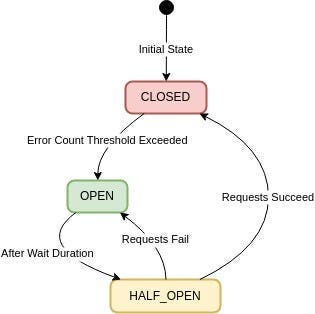
- Circuit Breaker: Stop hammering broken services
- Timeout: Prevent hanging operations
- Fallback: Return a default value or cached response
- Bulkhead Isolation: Limit the impact of slow dependencies
How to Integrate Polly with ASP.NET Core
Step 1: Install the Required Packages
dotnet add package Polly
dotnet add package Microsoft.Extensions.Http.Polly
Step 2: Configure HttpClientFactory with Policies
Use AddHttpClient and attach Polly policies:
services.AddHttpClient<IMyService, MyService>(client => {
    client.BaseAddress = new Uri("https://api.example.com");
})
.AddPolicyHandler(GetRetryPolicy())
.AddPolicyHandler(GetCircuitBreakerPolicy());
Step 3: Define the Policies
private static IAsyncPolicy<HttpResponseMessage> GetRetryPolicy() =>
    Policy.HandleResult<HttpResponseMessage>(r => !r.IsSuccessStatusCode)
          .WaitAndRetryAsync(3, attempt => TimeSpan.FromSeconds(Math.Pow(2, attempt)));

private static IAsyncPolicy<HttpResponseMessage> GetCircuitBreakerPolicy() =>
    Policy.HandleResult<HttpResponseMessage>(r => !r.IsSuccessStatusCode)
          .CircuitBreakerAsync(2, TimeSpan.FromSeconds(30));
Step 4: Inject and Use Your Client
public class MyController : ControllerBase
{
    private readonly IMyService _service;
    public MyController(IMyService service) => _service = service;

    [HttpGet("data")]
    public async Task<IActionResult> GetData() {
        var result = await _service.FetchAsync();
        return Ok(result);
    }
}
Real-World Example: Handling Black Friday Traffic
Imagine your product service depends on three external vendors. On Black Friday, two APIs go down:
- Without Polly: Your microservice crashes, and users see 500 errors.
- With Polly: Polly opens the circuit, prevents overload, retries wisely, and serves fallback data from the cache.
Result: Polly keeps your services online, protects your threads, and shields your backend from cascading failures.
“A resilient microservice doesn’t just survive failure — it learns from it. Polly makes that possible.”
The difference? Uptime, stability, and a happy customer base.
Best Practices for Polly in .NET Microservices
- Start Simple: Add retry and timeout policies first.
- Centralize Policies: Keep them in one file or class.
- Monitor Everything: Use telemetry tools like OpenTelemetry or Application Insights.
- Load Test: Stress your policies before going live.
- Tune Continuously: Adjust thresholds based on real traffic and logs.
📖 Related: Still Debugging .NET Microservices in the Dark? — Learn how to add tracing and observability to your Polly-powered services.
👉 Want visuals for Polly’s circuit breaker states or a retry diagram? Drop a comment below or DM me — I’ll add them to the article!
💬 “A resilient microservice doesn’t just survive failure — it learns from it. Polly makes that possible.”
— Every .NET architect after Black Friday
Final Thoughts: Build Stronger Microservices
Polly isn’t just a helper — it’s an essential part of any production-ready microservice. By combining it with ASP.NET Core’s HttpClientFactory, you can create systems that survive downtime, reduce error rates, and scale confidently.
💬 What’s your favorite Polly policy? Share your stories in the comments.
Resources
- Polly GitHub
- Microsoft Docs on HttpClientFactory
- .NET Microservices eBook by Microsoft
- OpenTelemetry for .NET