Here’s a practical way to build an API Gateway in .NET with load-balancing, + multiple implementation choices
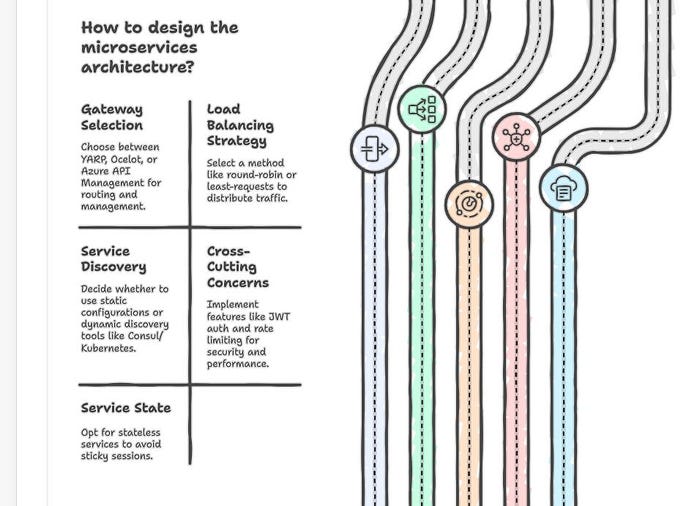
What we’ll typically need
- Gateway: YARP (recommended) or Ocelot; or a managed gateway (Azure API Management) in front of your services.
- Load balancing: round-robin / least-requests / power-of-two choices (YARP), or Ocelot’s built-ins. Health checks to avoid sending traffic to bad instances.
- Service discovery (optional): static destinations in config, or Consul/Kubernetes to auto-discover.
- Cross-cutting: JWT auth, rate limiting, caching, circuit-breaker (Polly), logging/tracing (OpenTelemetry).
- Stateless services: so you don’t need sticky sessions (use them only if you must).
Option A (recommended): .NET YARP (Reverse Proxy) as API Gateway
1) Install
dotnet add package Yarp.ReverseProxy
dotnet add package Microsoft.AspNetCore.Authentication.JwtBearer
2) Program.cs (Minimal API)
using Microsoft.AspNetCore.Authentication.JwtBearer;
using Microsoft.IdentityModel.Tokens;

var builder = WebApplication.CreateBuilder(args);
// JWT auth (adapt authority/audience for your IdP)
builder.Services
    .AddAuthentication(JwtBearerDefaults.AuthenticationScheme)
    .AddJwtBearer(opts =>
    {
        opts.Authority = "https://our-idp.example.com/";
        opts.Audience  = "api-gateway";
        opts.TokenValidationParameters = new TokenValidationParameters
        {
            ValidateIssuer = true, ValidateAudience = true, ValidateLifetime = true
        };
    });
builder.Services.AddAuthorization(options =>
{
    options.AddPolicy("JwtPolicy", policy => policy.RequireAuthenticatedUser());
});
// YARP from config
builder.Services.AddReverseProxy()
    .LoadFromConfig(builder.Configuration.GetSection("ReverseProxy"));
var app = WebApplication.Create(builder);
// Order matters
app.UseHttpsRedirection();
app.UseAuthentication();
app.UseAuthorization();
// Optional: global rate limit (use middleware or third-party package if needed)
// app.UseIpRateLimiting(); // if using AspNetCoreRateLimit
// Expose a health endpoint for gateway itself
app.MapGet("/healthz", () => Results.Ok("ok"));
app.MapReverseProxy();
app.Run();
3) appsettings.json (routes, clusters, load-balancing + health checks)
{
  "ReverseProxy": {
    "Routes": [
      {
        "RouteId": "products",
        "ClusterId": "products-cluster",
        "Match": { "Path": "/products/{**catch-all}" },
        "AuthorizationPolicy": "JwtPolicy"        // enforce JWT on this route
      },
      {
        "RouteId": "orders",
        "ClusterId": "orders-cluster",
        "Match": { "Path": "/orders/{**catch-all}" }
      }
    ],
    "Clusters": {
      "products-cluster": {
        "LoadBalancingPolicy": "RoundRobin",      // or LeastRequests, PowerOfTwoChoices
        "SessionAffinity": { "Enabled": false },  // enable only if you truly need sticky sessions
        "HealthCheck": {
          "Active": { "Enabled": true, "Interval": "00:00:10", "Timeout":"00:00:03", "Path": "/health" },
          "Passive": { "Enabled": true, "ReactivationPeriod": "00:00:30" }
        },
        "Destinations": {
          "p1": { "Address": "http://products-1:5001/" },
          "p2": { "Address": "http://products-2:5002/" }
        }
      },
      "orders-cluster": {
        "LoadBalancingPolicy": "LeastRequests",
        "HealthCheck": {
          "Active": { "Enabled": true, "Path": "/health" },
          "Passive": { "Enabled": true }
        },
        "Destinations": {
          "o1": { "Address": "http://orders-1:6001/" },
          "o2": { "Address": "http://orders-2:6002/" },
          "o3": { "Address": "http://orders-3:6003/" }
        }
      }
    }
  }
}
Notes
- Each microservice should expose
GET /health(returns 200 when healthy). - YARP will actively probe
/healthand passively eject failing instances. - Put shared concerns (auth, headers, transforms, request/response limits) at the route/cluster level.
4) Local multi-instance demo with Docker Compose
# docker-compose.yml
version: "3.9"
services:
  gateway:
    build: ./Gateway
    ports: ["8080:8080"]
    depends_on: [products-1, products-2]
  products-1:
    build: ./ProductsService
    environment: [ ASPNETCORE_URLS=http://+:5001 ]
  products-2:
    build: ./ProductsService
    environment: [ ASPNETCORE_URLS=http://+:5002 ]
Products microservice (minimal) should have:
var app = WebApplication.Create(args);
app.MapGet("/health", () => Results.Ok());
app.MapGet("/products", () => new[] { "A", "B" });
app.Run();
Test:
curl http://localhost:8080/products
# hit repeatedly and watch responses alternate across instances (round-robin)
Option B: Ocelot as API Gateway (with Consul or static)
1) Install
dotnet add package Ocelot
dotnet add package Consul
2) Program.cs
using Ocelot.DependencyInjection;
using Ocelot.Middleware;

var builder = WebApplication.CreateBuilder(args);
builder.Configuration.AddJsonFile("ocelot.json", optional: false, reloadOnChange: true);
builder.Services.AddOcelot();
var app = builder.Build();
await app.UseOcelot();
app.Run();
3) ocelot.json (load balancing + service discovery)
{
  "Routes": [
    {
      "DownstreamPathTemplate": "/{everything}",
      "DownstreamScheme": "http",
      "ServiceName": "products",                 // logical name from Consul
      "UpstreamPathTemplate": "/products/{everything}",
      "UpstreamHttpMethod": [ "Get", "Post" ],
      "LoadBalancerOptions": { "Type": "RoundRobin" },
      "QoSOptions": { "ExceptionsAllowedBeforeBreaking": 3, "DurationOfBreak": 1000, "TimeoutValue": 3000 }
    }
  ],
  "GlobalConfiguration": {
    "ServiceDiscoveryProvider": {
      "Type": "Consul",
      "Host": "consul",
      "Port": 8500
    }
  }
}
Register our service in Consul from .NET (example)
using Consul;
var consul = new ConsulClient(c => c.Address = new Uri("http://consul:8500"));
await consul.Agent.ServiceRegister(new AgentServiceRegistration
{
    ID = "products-5001",
    Name = "products",
    Address = "products-1",
    Port = 5001,
    Check = new AgentServiceCheck { HTTP = "http://products-1:5001/health", Interval = TimeSpan.FromSeconds(10) }
});
(We can also skip Consul and list DownstreamHostAndPorts statically.)
Option C: Azure-native (fully managed)
- Azure API Management (APIM) as Gateway (policies, JWT, quotas, caching).
- Azure Front Door (global anycast + WAF) in front for global LB.
- App Service or AKS for services; health probes do instance LB.
- You configure load-balancing at App Service/AKS or via Front Door’s backend pool with health probes. APIM adds routing, transforms, and security.
Option D: Kubernetes (YARP inside cluster)
- Run YARP as a Deployment; point clusters to K8s Services (ClusterIP).
- K8s Service already round-robins across pods; YARP adds auth, routing, rate-limit, and edge features.
- External access via Ingress (Nginx/Traefik) or a cloud LB → Gateway Service.
Example K8s Service for products:
apiVersion: v1
kind: Service
metadata: { name: products }
spec:
  selector: { app: products }
  ports:
    - port: 80
      targetPort: 5001
YARP cluster destination becomes http://products/ (DNS within cluster).
Common add-ons (with YARP)
Rate limiting
- Quick start:
AspNetCoreRateLimitpackage for IP/Client-ID limits at gateway.
Caching
- Response caching middleware for cacheable GETs, or put a Redis layer (OutputCache / custom policy) at gateway.
Resilience
- Wrap outbound calls with Polly via a delegating handler:
builder.Services.AddHttpClient("yarp-forward")
    .AddTransientHttpErrorPolicy(p => p.CircuitBreakerAsync(5, TimeSpan.FromSeconds(30)))
    .AddTransientHttpErrorPolicy(p => p.WaitAndRetryAsync(3, i => TimeSpan.FromMilliseconds(200 * i)));
(In YARP 2.x, we can attach handlers per cluster via HttpClient transforms or use proxies’ built-in policies.)
Observability
- Add OpenTelemetry (traces + metrics) at gateway and services for end-to-end visibility.
When to choose what
- YARP: fastest path in pure .NET, rich LB/health checks, easy config, first-class in ASP.NET Core.
- Ocelot: simple, mature; good if you already use it, or want Consul-style discovery out of the box.
- Managed (APIM): enterprise governance, policies, portal, analytics; pair with Front Door for global LB.
- Kubernetes: if you’re already on K8s; let Services do LB, keep YARP for gateway concerns.