Most .NET apps don’t fail from CPU limits; they fail from bad concurrency. Here are 5 patterns that actually scale in production.
Why Most .NET Performance Problems Aren’t Hardware Problems
I’ve debugged enough production outages to know this: thread pool starvation kills more .NET APIs than CPU limits ever will.
The symptoms are always the same. Your app runs fine under light load, then suddenly dies around 500–1000 concurrent requests. CPU usage sits at 30%. Memory looks normal. But response times spike to 30+ seconds, and requests start timing out.
The culprit? Usually, a single synchronous call blocks async threads. One .Result or .Wait() in the wrong place can cascade into complete thread pool exhaustion. I’ve seen this pattern destroy systems that should have easily handled 10x the load.
Concurrency patterns determine your scaling ceiling, not server specs. Choose the wrong pattern and you’ll hit walls at embarrassingly low traffic levels. Choose the right ones, and your system will scale smoothly until you actually hit resource limits.
Here are the five concurrency patterns that consistently work at scale, with the specific scenarios where each one matters most.
1. Async/Await: The Foundation That Keeps Servers Breathing
Why it matters: Every I/O operation in your app — database queries, HTTP calls, file reads — can either block a thread or free it up for other work. That choice determines whether your app scales linearly or hits a wall.
How Async/Await Actually Works
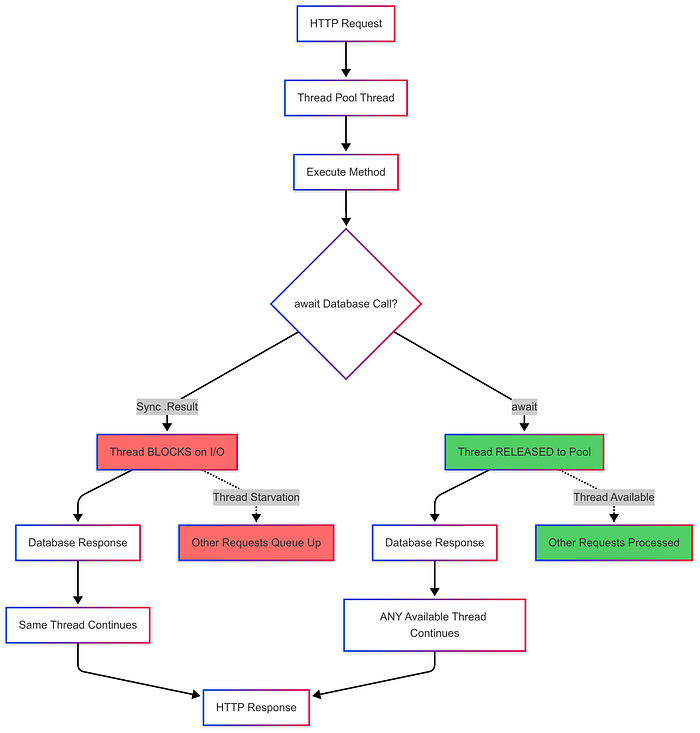
The key difference: Async releases the thread completely during I/O. Any thread can pick up the continuation when the database responds.
Production Lessons Learned
In our fintech API, switching from synchronous EF Core to async eliminated thread pool starvation and allowed us to scale from 800 RPS to 3,000 RPS on the same hardware. The database became our bottleneck, not the application threads.
⚠️ Common Pitfall: Using .Result or .Wait() in async contexts creates deadlocks and thread starvation.
The Code That Kills Performance
// DON'T: Blocks threads, causes deadlocks
public IActionResult GetUserBalance(int userId)
{
    var user = _context.Users.FindAsync(userId).Result; // Thread killer
    return Ok(user.Balance);
}

// DO: Frees threads for other requests
public async Task<IActionResult> GetUserBalance(int userId)
{
    var user = await _context.Users.FindAsync(userId);
    return Ok(user.Balance);
}
⚠️ Common Pitfall: Never use async void – exceptions disappear:
// DON'T: Exception vanishes
public async void ProcessPayment() => await _service.ProcessAsync();

// DO: Proper error propagation
public async Task ProcessPayment() => await _service.ProcessAsync();
2. Channels: Backpressure That Actually Works
Why it matters: Traditional queues like ConcurrentQueue<T> or BlockingCollection<T> either drop work under load or consume unlimited memory. Channels give you bounded queues with configurable backpressure – exactly what you need for background jobs.
Channel Backpressure Flow
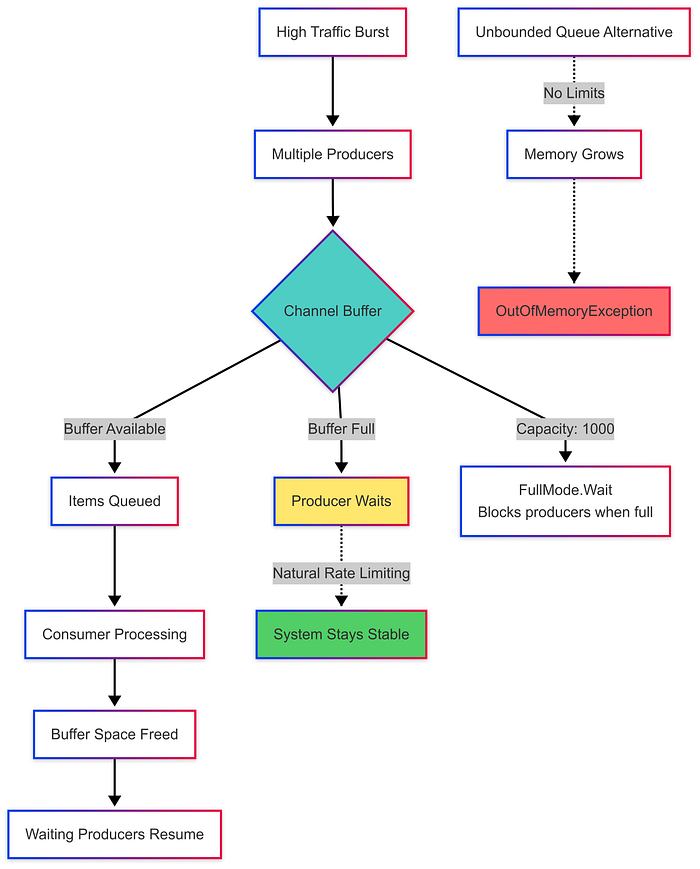
The magic: Bounded channels automatically create pushback without complex throttling logic. Your system self-regulates under load.
Production Lessons Learned
At a SaaS platform I architected, our webhook delivery system used an unbounded queue. Traffic spikes would allocate millions of webhook messages, killing our pod with OOM errors. Switching to bounded Channels with backpressure kept memory flat and naturally rate-limited burst traffic.
✅ Best Practice: Always use bounded channels in production to prevent memory explosions.
Bounded Channel Setup
// Configure bounded channel in DI
var channel = Channel.CreateBounded<WorkItem>(new BoundedChannelOptions(1000)
{
    FullMode = BoundedChannelFullMode.Wait // Critical: blocks instead of OOM
});
services.AddSingleton(channel);
Producer Pattern
// For HTTP handlers - don't block request threads
public async Task<IActionResult> QueueWorkAsync(WorkItem item)
{
    // Fire-and-forget pattern to avoid request thread blocking
    _ = Task.Run(async () =>
    {
        try
        {
            await _channelWriter.WriteAsync(item);
        }
        catch (Exception ex)
        {
            _logger.LogError(ex, "Failed to queue work item {Id}", item.Id);
        }
    });

    return Accepted(); // Return immediately
}

// For background services - blocking is acceptable
public async Task<bool> QueueWorkDirectAsync(WorkItem item)
{
    await _channelWriter.WriteAsync(item); // Can block when channel is full
    return true;
}
⚠️ Context Matters: Be careful where you call WriteAsync on bounded channels. If called from HTTP request threads, backpressure can introduce request latency. Use fire-and-forget patterns or move channel writes off the request path.
Consumer Pattern
protected override async Task ExecuteAsync(CancellationToken stoppingToken)
{
    await foreach (var item in _channelReader.ReadAllAsync(stoppingToken))
    {
        await ProcessWorkItemAsync(item, stoppingToken);
    }
}
Why Bounded Channels Create Natural Backpressure
With FullMode.Wait, when your queue fills up, producers naturally slow down instead of crashing your app. This creates automatic backpressure that keeps your system stable under load spikes.
3. System.IO.Pipelines: Stream Processing Without GC Pressure
Why it matters: Traditional stream handling copies buffers repeatedly, causing massive garbage collection overhead. At high throughput — WebSocket feeds, TCP servers, message brokers — this becomes your performance ceiling.
Pipeline vs Traditional Stream Processing
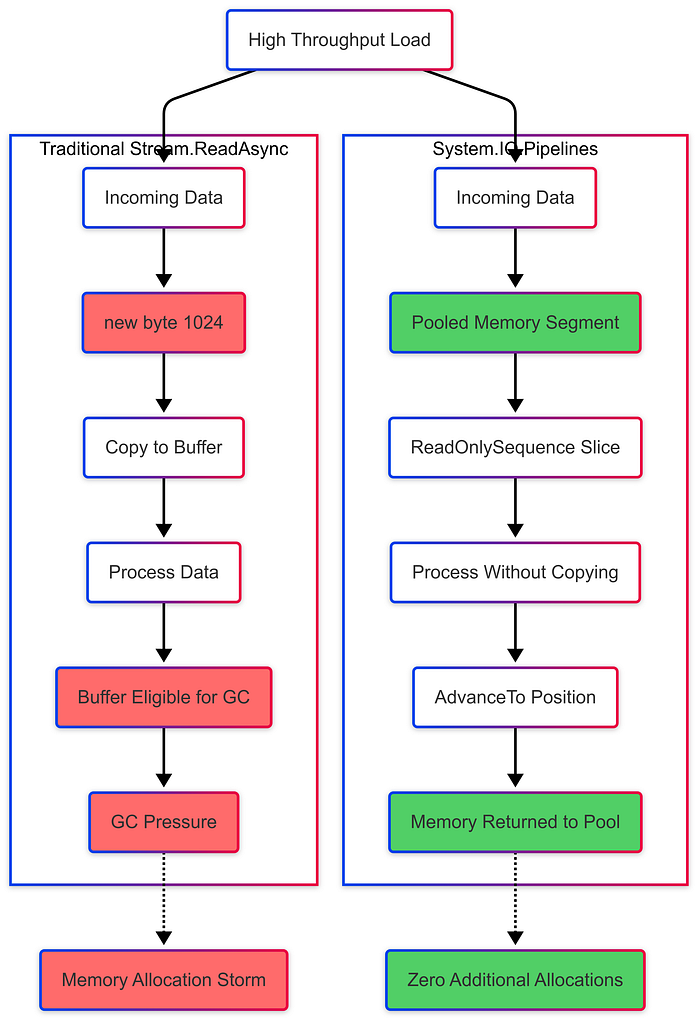
The performance difference: Traditional streams create new byte arrays for every read operation. Pipelines use pooled, reusable memory segments.
Production Lessons Learned
I learned this lesson the hard way at a payment gateway that processed 50,000 transactions per minute. Our naive Stream.ReadAsync approach was allocating 2GB per hour in temporary buffers. Switching to Pipelines dropped allocations by 65% and eliminated GC pauses during peak traffic.
✅ Best Practice: Use Pipelines for any high-throughput streaming scenario to eliminate allocation overhead.
Zero-Allocation Stream Parsing
public async Task ReadMessagesAsync(PipeReader reader, CancellationToken ct)
{
    while (!ct.IsCancellationRequested)
    {
        var result = await reader.ReadAsync(ct);
        var buffer = result.Buffer;

        // Parse complete messages without copying buffers
        while (TryParseMessage(ref buffer, out var message))
        {
            await HandleMessageAsync(message, ct);
        }

        reader.AdvanceTo(buffer.Start, buffer.End);
        if (result.IsCompleted) break;
    }
}
Efficient Message Parser
private bool TryParseMessage(ref ReadOnlySequence<byte> buffer, out Message message)
{
    if (buffer.Length < 4) { message = default; return false; }

    // Zero-allocation: use BinaryPrimitives instead of ToArray()
    var lengthSpan = buffer.Slice(0, 4);
    int length;

    if (!lengthSpan.IsSingleSegment)
    {
        Span<byte> temp = stackalloc byte[4];
        lengthSpan.CopyTo(temp);
        length = BinaryPrimitives.ReadInt32LittleEndian(temp);
    }
    else
    {
        length = BinaryPrimitives.ReadInt32LittleEndian(lengthSpan.FirstSpan);
    }

    if (buffer.Length < 4 + length) { message = default; return false; }

    message = new Message(buffer.Slice(4, length).ToArray()); // Only allocation needed
    buffer = buffer.Slice(4 + length);
    return true;
}
⚠️ Common Pitfall: Using .ToArray() on small spans defeats Pipeline’s zero-allocation benefits. Use BinaryPrimitives for parsing integers and primitives.
Why Pipelines Win at Scale
Pipelines use pooled memory and avoid intermediate allocations. The same code that would create thousands of temporary byte arrays per second with Stream.ReadAsync creates zero allocations with proper Pipeline usage.
4. Actor Pattern: Scaling by Isolating State
Why it matters: Lock-based concurrency is a bug magnet and performance killer. Actors solve this by giving each entity its own message queue and state. Since only one message is processed at a time, you need zero locks.
Actor Message Processing Flow

Key insight: Multiple clients can access the actor concurrently, but the actor processes messages sequentially, eliminating the need for locks.
Production Lessons Learned
At a multi-tenant SaaS platform, our shared dictionary lookups were causing request pileups due to lock contention. Moving to an Orleans actor-per-tenant model eliminated all locking overhead and doubled our throughput under peak load.
✅ Best Practice: Use actors for stateful entities (user sessions, accounts, game objects) to eliminate lock contention.
Simple Actor Pattern (Educational Example)
public class AccountActor
{
    private readonly Channel<IAccountMessage> _messages = Channel.CreateUnbounded<IAccountMessage>();
    private decimal _balance;

    public AccountActor() => _ = ProcessMessagesAsync();

    public async Task<decimal> GetBalanceAsync()
    {
        var tcs = new TaskCompletionSource<decimal>();
        await _messages.Writer.WriteAsync(new GetBalanceMessage(tcs));
        return await tcs.Task;
    }

    private async Task ProcessMessagesAsync()
    {
        await foreach (var msg in _messages.Reader.ReadAllAsync())
        {
            // Process one message at a time - no locks needed
            if (msg is GetBalanceMessage getBalance)
                getBalance.Result.SetResult(_balance);
        }
    }
}
⚠️ Production Note: The above is educational. For production systems, use proven frameworks like Orleans (Microsoft’s virtual actors) or Akka.NET rather than building your own actor system.
Production-Ready Actor Frameworks
For enterprise systems, consider these proven frameworks:
- Orleans: Microsoft’s virtual actors, used in Xbox Live and Azure services
- Proto.Actor: Lightweight, Go-inspired actor model
- Akka.NET: Full-featured, battle-tested in the JVM ecosystem
⚠️ Actor Limitations: Actors aren’t a silver bullet. They have message dispatching overhead and can create bottlenecks if a single actor becomes a hotspot. Consider partitioning strategies (user ID sharding, geographic distribution) to avoid single-actor bottlenecks. Also, be cautious of complex actor dependency chains that can create latency cascades.
⚠️ Common Pitfall: Don’t build actors for simple read-only scenarios — the message overhead isn’t worth it without mutable state.
5. Parallel.ForEachAsync: CPU Work That Uses All Cores
Why it matters: For CPU-intensive tasks, you want to use all available cores. Parallel.ForEachAsync (introduced in .NET 6) handles both CPU-bound work and async I/O operations in parallel safely.
Parallel.ForEachAsync Execution Flow
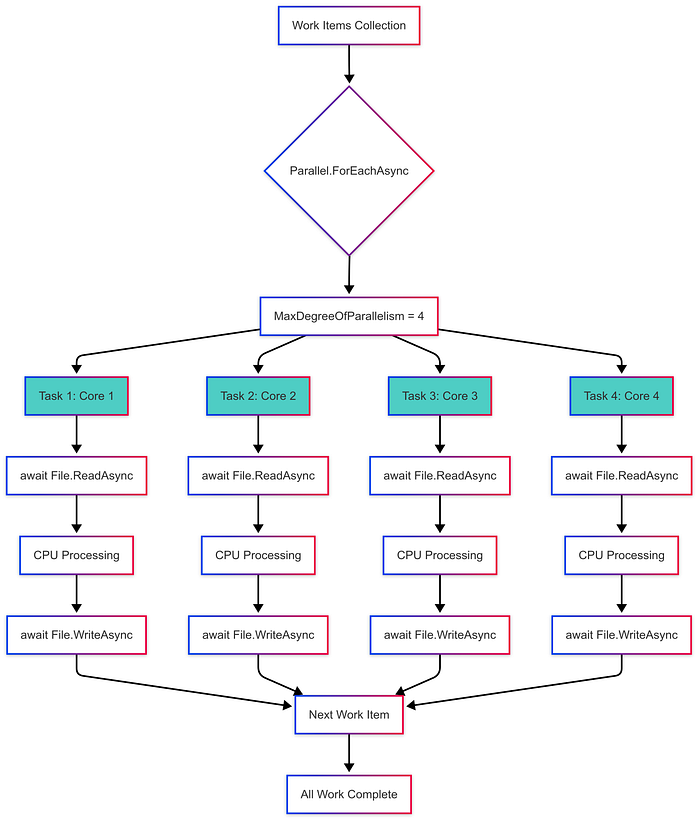
Execution model: Each parallel task handles its own async I/O operations while CPU work is distributed across available cores. Tasks automatically pick up new work items as they complete.
Production Lessons Learned
I used this pattern in a batch processing job that needed to resize 500,000 images daily. Sequential processing took 7 hours. Parallel processing cut it to 90 minutes on an 8-core machine, with zero complex threading code.
✅ Best Practice: Use Parallel.ForEachAsync for mixed workloads that combine I/O operations with CPU processing.
CPU + I/O Parallel Processing
// Process images across all CPU cores
await Parallel.ForEachAsync(imagePaths,
    new ParallelOptions { MaxDegreeOfParallelism = Environment.ProcessorCount },
    async (imagePath, ct) =>
    {
        var imageData = await File.ReadAllBytesAsync(imagePath, ct); // I/O
        var processed = ResizeImage(imageData); // CPU work
        await File.WriteAllBytesAsync($"{imagePath}.out", processed, ct); // I/O
    });
Mixed I/O + CPU Workloads
// Download and process URLs in parallel
await Parallel.ForEachAsync(urls,
    new ParallelOptions { MaxDegreeOfParallelism = 10 }, // Limit concurrent downloads
    async (url, ct) =>
    {
        try
        {
            var content = await _httpClient.GetByteArrayAsync(url, ct); // I/O
            var processed = ProcessContent(content); // CPU
            await SaveResultAsync(processed, ct); // I/O
        }
        catch (Exception ex)
        {
            // Handle individual failures - exceptions don't propagate to other iterations
            _logger.LogError(ex, "Failed to process {Url}", url);
            // Consider collecting errors for batch reporting
        }
    });
⚠️ I/O-Heavy Workload Warning: For pure I/O tasks (many HTTP calls, database queries), Parallel.ForEachAsync can be inefficient because each iteration holds a thread pool thread while awaiting. Consider SemaphoreSlim + Task.WhenAll instead:
// More efficient for I/O-heavy workloads
var semaphore = new SemaphoreSlim(10); // Limit concurrency
var tasks = urls.Select(async url =>
{
    await semaphore.WaitAsync();
    try
    {
        return await _httpClient.GetByteArrayAsync(url);
    }
    finally
    {
        semaphore.Release();
    }
});

var results = await Task.WhenAll(tasks);
⚠️ Exception Behavior: Parallel.ForEachAsync stops on the first unhandled exception and only surfaces that one exception. Handle exceptions inside each iteration or use aggregation patterns if you need to collect all failures.
Tuning for Different Workloads
✅ Best Practice: Adjust MaxDegreeOfParallelism based on workload characteristics:
- CPU-bound:
Environment.ProcessorCount - I/O-bound: Higher values (10–50) depending on external service limits
- Mixed workload: Start with
ProcessorCount * 2and measure
Choosing the Right Pattern: Quick Decision Guide
Web APIs and Request Handling: Always start with async/await everywhere.
Background Job Queues: Use Channels with bounded capacity and FullMode.Wait.
High-Throughput Streaming: Use System.IO.Pipelines for WebSockets, TCP servers, or message processing.
Stateful, Multi-User Systems: Consider Actors (Orleans/Akka.NET for production) for gaming, real-time collaboration, or multi-tenant SaaS.
CPU-Intensive Batch Jobs: Use Parallel.ForEachAsync with:
MaxDegreeOfParallelism = Environment.ProcessorCountfor CPU-bound work- Higher values (10–50) for I/O-bound work
ProcessorCount * 2for mixed workloads (measure and adjust)
Production Architecture Example
Our fintech platform combines these patterns:
- Async/await for API endpoints
- Channels for payment processing queues with bounded capacity (1000 items,
FullMode.Wait) - Pipelines for real-time transaction feeds
- Orleans actors for account state management
- Parallel.ForEachAsync for nightly batch reconciliation
Each pattern addresses specific scaling bottlenecks. Together, they create systems that scale both horizontally and vertically.
Take Action Today
Start by auditing your current codebase for these anti-patterns:
- Synchronous database calls in web controllers (blocking threads)
- Unbounded queues that can consume unlimited memory
- Stream processing creates excessive temporary allocations
- Lock contention around shared state
- Sequential processing of parallelizable CPU work
Fix one pattern at a time, measure the impact, and build confidence in these approaches.
For your next system design, bookmark this guide and choose patterns upfront based on your scaling requirements.
The architectural decisions you make today determine whether you’ll be debugging threading issues at 3 AM or watching your system scale smoothly under load.