Your .NET API flies in dev — but under real load? It slows, times out, or just dies. Sound familiar?
As APIs scale, so does the need to handle more concurrent requests without scaling infrastructure linearly. That’s where asynchronous programming comes in. In this guide, you’ll learn how async patterns like async/await, TPL, and Rx.NET can dramatically boost your API’s performance, readability, and scalability.

Why Async Programming Matters for .NET APIs
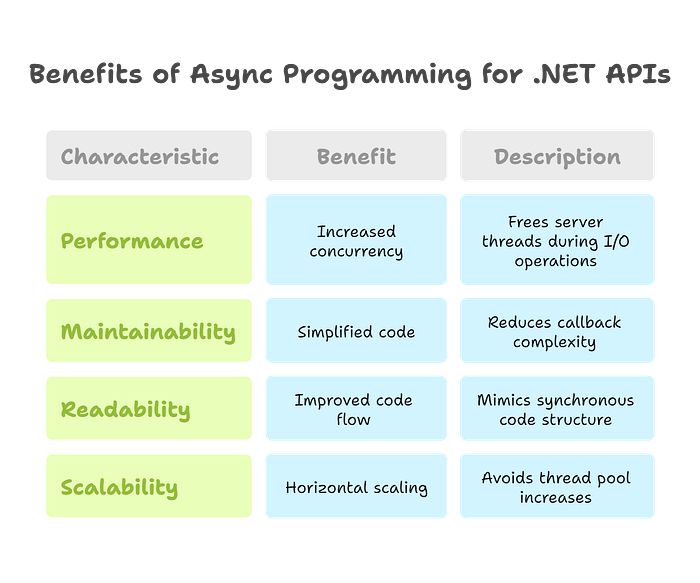
Performance
Asynchronous code frees up server threads while waiting for I/O operations like database or HTTP requests. This means more concurrent requests without spinning up more threads.
Maintainability
Async/await simplifies previously complex async code, reducing callback hell and improving developer happiness.
Readability
Async code in C# now reads top-down like synchronous code. The mental overhead for maintaining async logic has dropped significantly.
Scalability
Async allows you to scale horizontally without increasing the thread pool or using expensive infrastructure.
⚠️ Real-World Bottleneck: Ride-Sharing Example
Imagine a spike in ride requests — synchronous API calls block while waiting on external services. Async avoids thread starvation and improves request throughput.
Choosing the Right Pattern
I/O-bound vs CPU-bound: Know the Difference
- I/O-bound: Database, HTTP, file I/O (use
async/await) - CPU-bound: Image processing, calculations (use TPL or
Task.Run)
⚠️ Pro Tip: Be extra cautious of “sync over async” — where a method looks async but blocks under the hood. It’s a silent performance killer.
Decision Checklist
- Do you need to await an I/O call? ✅ async/await
- Do you need parallel computation? ✅ TPL
- Do you process streams or events? ✅ Rx.NET
Trade-offs to Watch For
- Simplicity vs performance
- Debugging async flows
- Exception handling in tasks
Side-by-Side Comparison of .NET Async Options
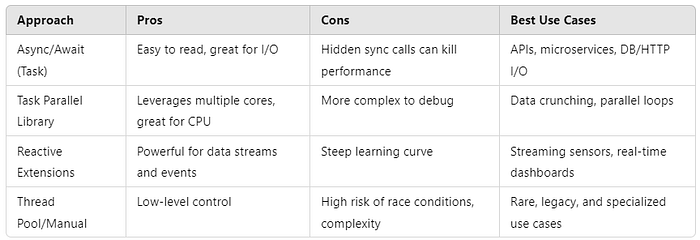
👇 Which async approach has saved your bacon in production? Drop your story in the comments — we all learn from battle scars.
Real-World .NET Code Examples
Async/Await in Web API
// Non-blocking I/O call to external service
[HttpGet("{city}")]
public async Task<IActionResult> GetWeatherAsync(string city)
{
    var forecast = await _weatherService.GetForecastAsync(city);
    return forecast == null ? NotFound() : Ok(forecast);
}
CPU-bound Task with Parallel.For
// Run CPU-intensive task in parallel on background threads
await Task.Run(() => {
    Parallel.ForEach(data, item => Process(item));
});
Rx.NET Streaming Scenario
// Stream buffered values and compute average every 5 seconds
temperatureStream
    .Buffer(TimeSpan.FromSeconds(5))
    .Select(t => t.Average())
    .Subscribe(avg => Console.WriteLine($"Avg: {avg}"));

Async Best Practices in .NET
- Async All the Way Down: Don’t mix sync and async. Await all the way.
- Avoid Blocking Calls: Never use
.Result,.Wait(), orThread.Sleep()in async flows. - Use Cancellation Tokens: Let long-running ops be cancelable.
- Benchmark & Profile: Use BenchmarkDotNet, Application Insights, or VS Profiler to spot bottlenecks.
- Instrument with Logging: Use
ILoggerto track async flow, cancellations, and exception boundaries for better observability.
Conclusion & Takeaways
Summary Table: When to Use What
Scenario Use DB/HTTP/API Calls Async/Await CPU-Intensive Work TPL Real-Time Streams Rx.NET
Next Steps to Try in Your Codebase
- Convert blocking controller methods to async
- Profile your app under load
- Try Rx.NET for streaming scenarios
💬 Discussion
What’s your favourite async strategy in .NET — and why? Share your best win or worst mistake in the comments!
💡 What’s the trickiest async bug you’ve debugged in production — and how did you solve it?
References & Related Articles
Microsoft Docs:
Community Projects & Libraries:
Performance Benchmarks:
LINK: https://itnext.io/avoid-bottlenecks-3-async-patterns-to-supercharge-net-api-speed-d5d7763ad1fd