Building RESTful APIs typically involves leveraging frameworks like ASP.NET Core or Web API, but what if you wanted to understand the fundamental mechanics behind these powerful tools? This comprehensive guide will take you on an exciting journey to build a production-ready RESTful API from absolute scratch using pure C# and the HttpListener class. By the end of this 25-minute read, you’ll have mastered the core concepts, implemented every major component step-by-step, and gained invaluable insights into API performance optimization strategies used by tech giants like Google, Amazon, and Meta.
Understanding RESTful APIs: Foundation Concepts
What is a RESTful API?
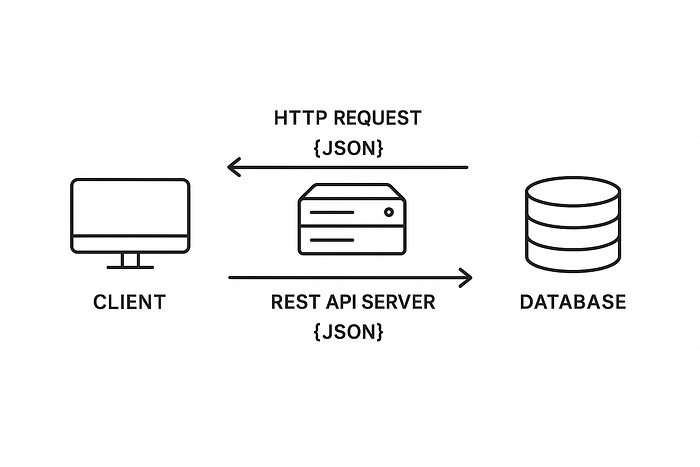
REST (Representational State Transfer) is an architectural style that defines how applications communicate over HTTP. At its core, REST treats everything as a resource that can be uniquely identified by URLs and manipulated using standard HTTP methods. Unlike SOAP or other complex protocols, REST embraces the simplicity and ubiquity of HTTP, making it the de facto standard for modern web APIs.
Why Do We Need RESTful APIs?
In today’s interconnected world, applications rarely operate in isolation. RESTful APIs serve as the universal language that enables:
- Service Integration: Seamless communication between different applications and platforms
- Scalability: Independent scaling of different system components
- Platform Independence: Technology-agnostic communication using HTTP standards
- Mobile and Web Applications: Unified backend services for multiple client types
- Microservices Architecture: Loosely coupled services that can evolve independently
Core REST Principles
RESTful APIs are built upon six fundamental constraints:
- Stateless Communication: Each request contains all information needed for processing
- Client-Server Separation: Clear separation of concerns between data storage and user interface
- Uniform Interface: Consistent interaction patterns across all resources
- Cacheable: Responses can be cached to improve performance
- Layered System: Architecture can include intermediary layers like load balancers
- Resource-Based: Everything is treated as a resource with unique identifiers
HTTP Methods and Their Purposes
RESTful APIs use standard HTTP methods to perform CRUD operations:
- GET: Retrieve data from the server (Read)
- POST: Create new resources (Create)
- PUT: Update or replace existing resources (Update)
- DELETE: Remove resources (Delete)
- PATCH: Partial updates to existing resources
Each method has specific characteristics regarding idempotency and safety. For example, GET requests are both safe (don’t modify server state) and idempotent (multiple identical requests have the same effect), while POST requests are neither safe nor idempotent.
Step-by-Step Implementation Guide
Step 1: Project Setup and Basic Structure
Let’s start by creating our foundation. Create a new Console Application in Visual Studio:
using System;
using System.Net;
using System.Threading.Tasks;
using System.Text;
using System.IO;
using System.Text.Json;

namespace RESTfulAPIFromScratch
{
    class Program
    {
        static async Task Main(string[] args)
        {
            var server = new HttpAPIServer();
            await server.StartAsync();
        }
    }

    public class HttpAPIServer
    {
        private HttpListener _listener;
        private readonly string _baseUrl = "http://localhost:8080/";

        public async Task StartAsync()
        {
            _listener = new HttpListener();
            _listener.Prefixes.Add(_baseUrl);
            _listener.Start();

            Console.WriteLine($"API Server started at {_baseUrl}");
            Console.WriteLine("Press Ctrl+C to stop...");

            await ListenForRequestsAsync();
        }

        private async Task ListenForRequestsAsync()
        {
            while (_listener.IsListening)
            {
                var context = await _listener.GetContextAsync();
                _ = ProcessRequestAsync(context); // Fire and forget
            }
        }

        private async Task ProcessRequestAsync(HttpListenerContext context)
        {
            // We'll implement this in the next steps
            var response = context.Response;
            response.StatusCode = 200;
            response.Close();
        }
    }
}
Why this approach works: We’re using async/await patterns to handle multiple concurrent requests efficiently, which is crucial for API performance.
Step 2: Basic HTTP Server Implementation

The HttpListener class is our gateway to HTTP communications. Let’s expand our server to handle different HTTP methods:
private async Task ProcessRequestAsync(HttpListenerContext context)
{
    var request = context.Request;
    var response = context.Response;

    try
    {
        Console.WriteLine($"{DateTime.Now:yyyy-MM-dd HH:mm:ss} - {request.HttpMethod} {request.Url}");

        // Set CORS headers for browser compatibility
        response.Headers.Add("Access-Control-Allow-Origin", "*");
        response.Headers.Add("Access-Control-Allow-Methods", "GET, POST, PUT, DELETE, OPTIONS");
        response.Headers.Add("Access-Control-Allow-Headers", "Content-Type");

        // Handle preflight requests
        if (request.HttpMethod == "OPTIONS")
        {
            response.StatusCode = 200;
            response.Close();
            return;
        }

        await RouteRequestAsync(request, response);
    }
    catch (Exception ex)
    {
        await HandleErrorAsync(response, ex);
    }
}

private async Task HandleErrorAsync(HttpListenerResponse response, Exception ex)
{
    response.StatusCode = 500;
    response.ContentType = "application/json";

    var errorResponse = new { error = "Internal Server Error", message = ex.Message };
    var jsonResponse = JsonSerializer.Serialize(errorResponse);
    var buffer = Encoding.UTF8.GetBytes(jsonResponse);

    await response.OutputStream.WriteAsync(buffer, 0, buffer.Length);
    response.Close();
}
Key Implementation Details: We’re implementing proper CORS headers to enable browser-based clients, handling OPTIONS preflight requests, and establishing a foundation for error handling.
Step 3: Request Parsing and Header Extraction
Understanding incoming requests is crucial. Let’s parse headers, query parameters, and request bodies:
public class RequestParser
{
    public static async Task<ApiRequest> ParseAsync(HttpListenerRequest request)
    {
        var apiRequest = new ApiRequest
        {
            Method = request.HttpMethod,
            Url = request.Url,
            Headers = new Dictionary<string, string>(),
            QueryParameters = ParseQueryString(request.Url.Query),
            Body = await ReadRequestBodyAsync(request)
        };

        // Extract headers
        foreach (string headerName in request.Headers.AllKeys)
        {
            apiRequest.Headers[headerName] = request.Headers[headerName];
        }

        return apiRequest;
    }

    private static Dictionary<string, string> ParseQueryString(string queryString)
    {
        var parameters = new Dictionary<string, string>();

        if (string.IsNullOrEmpty(queryString)) return parameters;

        queryString = queryString.TrimStart('?');
        var pairs = queryString.Split('&');

        foreach (var pair in pairs)
        {
            var keyValue = pair.Split('=');
            if (keyValue.Length == 2)
            {
                parameters[Uri.UnescapeDataString(keyValue)] =
                    Uri.UnescapeDataString(keyValue[1]);
            }
        }

        return parameters;
    }

    private static async Task<string> ReadRequestBodyAsync(HttpListenerRequest request)
    {
        if (request.ContentLength64 == 0) return string.Empty;

        using var reader = new StreamReader(request.InputStream, request.ContentEncoding);
        return await reader.ReadToEndAsync();
    }
}

public class ApiRequest
{
    public string Method { get; set; }
    public Uri Url { get; set; }
    public Dictionary<string, string> Headers { get; set; }
    public Dictionary<string, string> QueryParameters { get; set; }
    public string Body { get; set; }
}
Why proper parsing matters: This systematic approach to request parsing ensures we capture all relevant information while handling edge cases like empty bodies and URL encoding.
Step 4: Routing System Implementation
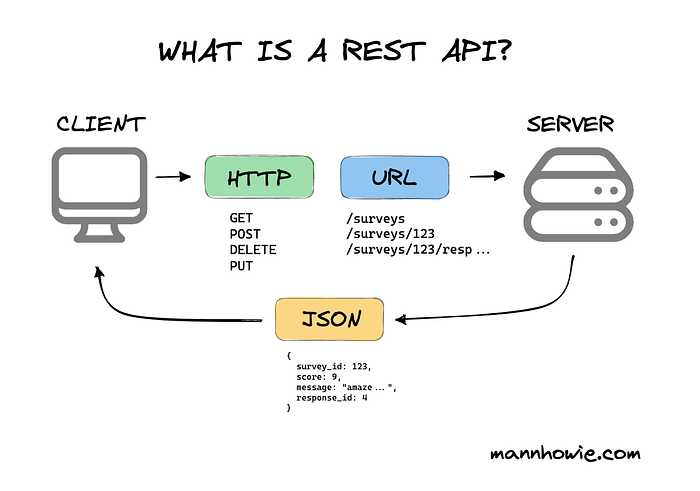
A robust routing system maps URLs to specific handlers. Let’s implement pattern matching:
public class ApiRouter
{
    private readonly Dictionary<string, Dictionary<string, Func<ApiRequest, Task<ApiResponse>>>> _routes;

    public ApiRouter()
    {
        _routes = new Dictionary<string, Dictionary<string, Func<ApiRequest, Task<ApiResponse>>>>();
    }

    public void AddRoute(string method, string pattern, Func<ApiRequest, Task<ApiResponse>> handler)
    {
        if (!_routes.ContainsKey(method))
            _routes[method] = new Dictionary<string, Func<ApiRequest, Task<ApiResponse>>>();

        _routes[method][pattern] = handler;
    }

    public async Task<ApiResponse> RouteAsync(ApiRequest request)
    {
        if (!_routes.ContainsKey(request.Method))
            return new ApiResponse { StatusCode = 405, Body = JsonSerializer.Serialize(new { error = "Method not allowed" }) };

        var methodRoutes = _routes[request.Method];
        var path = request.Url.AbsolutePath;

        // Exact match first
        if (methodRoutes.ContainsKey(path))
        {
            return await methodRoutes[path](request);
        }

        // Pattern matching for parameterized routes
        foreach (var route in methodRoutes)
        {
            if (MatchesPattern(route.Key, path, out var parameters))
            {
                request.RouteParameters = parameters;
                return await route.Value(request);
            }
        }

        return new ApiResponse { StatusCode = 404, Body = JsonSerializer.Serialize(new { error = "Route not found" }) };
    }

    private bool MatchesPattern(string pattern, string path, out Dictionary<string, string> parameters)
    {
        parameters = new Dictionary<string, string>();

        var patternParts = pattern.Split('/');
        var pathParts = path.Split('/');

        if (patternParts.Length != pathParts.Length) return false;

        for (int i = 0; i < patternParts.Length; i++)
        {
            if (patternParts[i].StartsWith("{") && patternParts[i].EndsWith("}"))
            {
                var paramName = patternParts[i].Trim('{', '}');
                parameters[paramName] = pathParts[i];
            }
            else if (patternParts[i] != pathParts[i])
            {
                return false;
            }
        }

        return true;
    }
}
Routing Logic Explained: Our router supports both exact matches and parameterized routes (like /users/{id}), providing the flexibility needed for RESTful URL structures.
Step 5: HTTP Methods Handler Implementation
Let’s implement comprehensive CRUD operations with a simple in-memory data store:
public class UserController
{
    private static readonly List<User> _users = new List<User>
    {
        new User { Id = 1, Name = "John Doe", Email = "john@example.com" },
        new User { Id = 2, Name = "Jane Smith", Email = "jane@example.com" }
    };
    private static int _nextId = 3;

    // GET /api/users
    public static async Task<ApiResponse> GetAllUsers(ApiRequest request)
    {
        var response = new ApiResponse
        {
            StatusCode = 200,
            ContentType = "application/json",
            Body = JsonSerializer.Serialize(_users, new JsonSerializerOptions { PropertyNamingPolicy = JsonNamingPolicy.CamelCase })
        };

        return await Task.FromResult(response);
    }

    // GET /api/users/{id}
    public static async Task<ApiResponse> GetUserById(ApiRequest request)
    {
        if (!int.TryParse(request.RouteParameters["id"], out int userId))
        {
            return new ApiResponse { StatusCode = 400, Body = JsonSerializer.Serialize(new { error = "Invalid user ID" }) };
        }

        var user = _users.FirstOrDefault(u => u.Id == userId);
        if (user == null)
        {
            return new ApiResponse { StatusCode = 404, Body = JsonSerializer.Serialize(new { error = "User not found" }) };
        }

        return new ApiResponse
        {
            StatusCode = 200,
            ContentType = "application/json",
            Body = JsonSerializer.Serialize(user, new JsonSerializerOptions { PropertyNamingPolicy = JsonNamingPolicy.CamelCase })
        };
    }

    // POST /api/users
    public static async Task<ApiResponse> CreateUser(ApiRequest request)
    {
        try
        {
            var createUserRequest = JsonSerializer.Deserialize<CreateUserRequest>(request.Body,
                new JsonSerializerOptions { PropertyNamingPolicy = JsonNamingPolicy.CamelCase });

            if (string.IsNullOrEmpty(createUserRequest.Name) || string.IsNullOrEmpty(createUserRequest.Email))
            {
                return new ApiResponse { StatusCode = 400, Body = JsonSerializer.Serialize(new { error = "Name and Email are required" }) };
            }

            var newUser = new User
            {
                Id = _nextId++,
                Name = createUserRequest.Name,
                Email = createUserRequest.Email
            };

            _users.Add(newUser);

            return new ApiResponse
            {
                StatusCode = 201,
                ContentType = "application/json",
                Body = JsonSerializer.Serialize(newUser, new JsonSerializerOptions { PropertyNamingPolicy = JsonNamingPolicy.CamelCase })
            };
        }
        catch (JsonException)
        {
            return new ApiResponse { StatusCode = 400, Body = JsonSerializer.Serialize(new { error = "Invalid JSON format" }) };
        }
    }

    // PUT /api/users/{id}
    public static async Task<ApiResponse> UpdateUser(ApiRequest request)
    {
        if (!int.TryParse(request.RouteParameters["id"], out int userId))
        {
            return new ApiResponse { StatusCode = 400, Body = JsonSerializer.Serialize(new { error = "Invalid user ID" }) };
        }

        var user = _users.FirstOrDefault(u => u.Id == userId);
        if (user == null)
        {
            return new ApiResponse { StatusCode = 404, Body = JsonSerializer.Serialize(new { error = "User not found" }) };
        }

        try
        {
            var updateRequest = JsonSerializer.Deserialize<UpdateUserRequest>(request.Body,
                new JsonSerializerOptions { PropertyNamingPolicy = JsonNamingPolicy.CamelCase });

            if (!string.IsNullOrEmpty(updateRequest.Name))
                user.Name = updateRequest.Name;
            if (!string.IsNullOrEmpty(updateRequest.Email))
                user.Email = updateRequest.Email;

            return new ApiResponse
            {
                StatusCode = 200,
                ContentType = "application/json",
                Body = JsonSerializer.Serialize(user, new JsonSerializerOptions { PropertyNamingPolicy = JsonNamingPolicy.CamelCase })
            };
        }
        catch (JsonException)
        {
            return new ApiResponse { StatusCode = 400, Body = JsonSerializer.Serialize(new { error = "Invalid JSON format" }) };
        }
    }

    // DELETE /api/users/{id}
    public static async Task<ApiResponse> DeleteUser(ApiRequest request)
    {
        if (!int.TryParse(request.RouteParameters["id"], out int userId))
        {
            return new ApiResponse { StatusCode = 400, Body = JsonSerializer.Serialize(new { error = "Invalid user ID" }) };
        }

        var user = _users.FirstOrDefault(u => u.Id == userId);
        if (user == null)
        {
            return new ApiResponse { StatusCode = 404, Body = JsonSerializer.Serialize(new { error = "User not found" }) };
        }

        _users.Remove(user);

        return new ApiResponse { StatusCode = 204 }; // No Content
    }
}

public class User
{
    public int Id { get; set; }
    public string Name { get; set; }
    public string Email { get; set; }
}

public class CreateUserRequest
{
    public string Name { get; set; }
    public string Email { get; set; }
}

public class UpdateUserRequest
{
    public string Name { get; set; }
    public string Email { get; set; }
}
CRUD Implementation Strategy: Each method follows REST conventions, using appropriate HTTP status codes and implementing proper validation. The async patterns ensure non-blocking operations even with synchronous in-memory operations.
Step 6: JSON Serialization Support
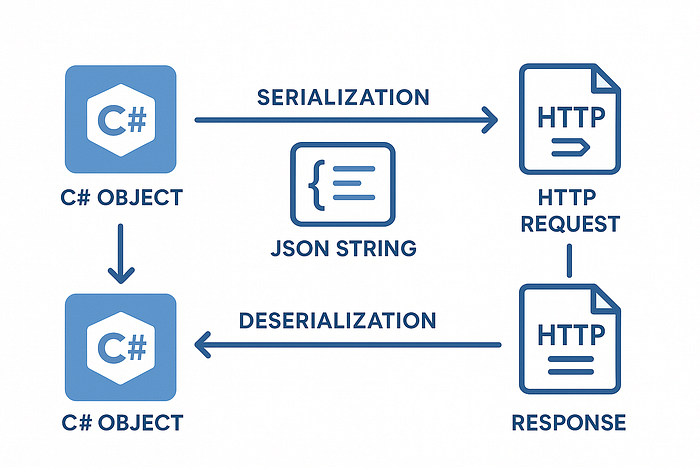
Modern APIs rely heavily on JSON for data exchange. Let’s implement robust serialization:
public static class JsonHelper
{
    private static readonly JsonSerializerOptions _serializerOptions = new JsonSerializerOptions
    {
        PropertyNamingPolicy = JsonNamingPolicy.CamelCase,
        WriteIndented = false,
        DefaultIgnoreCondition = JsonIgnoreCondition.WhenWritingNull,
        PropertyNameCaseInsensitive = true
    };

    public static string Serialize<T>(T obj)
    {
        return JsonSerializer.Serialize(obj, _serializerOptions);
    }

    public static T Deserialize<T>(string json)
    {
        if (string.IsNullOrWhiteSpace(json))
            throw new ArgumentException("JSON string cannot be null or empty");

        return JsonSerializer.Deserialize<T>(json, _serializerOptions);
    }

    public static bool TryDeserialize<T>(string json, out T result)
    {
        result = default(T);
        try
        {
            result = Deserialize<T>(json);
            return true;
        }
        catch
        {
            return false;
        }
    }
}
Serialization Best Practices: We’re using System.Text.Json for optimal performance, configuring camelCase naming to follow JavaScript conventions, and implementing error-safe deserialization methods.
Step 7: Response Formatting and Status Codes
Proper HTTP responses are crucial for API usability:
public class ApiResponse
{
    public int StatusCode { get; set; } = 200;
    public string ContentType { get; set; } = "application/json";
    public string Body { get; set; } = string.Empty;
    public Dictionary<string, string> Headers { get; set; } = new Dictionary<string, string>();
}

private async Task SendResponseAsync(HttpListenerResponse response, ApiResponse apiResponse)
{
    response.StatusCode = apiResponse.StatusCode;
    response.ContentType = apiResponse.ContentType;

    // Add custom headers
    foreach (var header in apiResponse.Headers)
    {
        response.Headers.Add(header.Key, header.Value);
    }

    if (!string.IsNullOrEmpty(apiResponse.Body))
    {
        var buffer = Encoding.UTF8.GetBytes(apiResponse.Body);
        response.ContentLength64 = buffer.Length;
        await response.OutputStream.WriteAsync(buffer, 0, buffer.Length);
    }

    response.Close();
}

// Common status code helpers
public static class StatusCodes
{
    public static ApiResponse Ok(object data) => new ApiResponse
    {
        StatusCode = 200,
        Body = JsonHelper.Serialize(data)
    };

    public static ApiResponse Created(object data) => new ApiResponse
    {
        StatusCode = 201,
        Body = JsonHelper.Serialize(data)
    };

    public static ApiResponse NoContent() => new ApiResponse { StatusCode = 204 };

    public static ApiResponse BadRequest(string message) => new ApiResponse
    {
        StatusCode = 400,
        Body = JsonHelper.Serialize(new { error = message })
    };

    public static ApiResponse NotFound(string message = "Resource not found") => new ApiResponse
    {
        StatusCode = 404,
        Body = JsonHelper.Serialize(new { error = message })
    };

    public static ApiResponse InternalServerError(string message = "Internal server error") => new ApiResponse
    {
        StatusCode = 500,
        Body = JsonHelper.Serialize(new { error = message })
    };
}
Step 8: Global Error Handling
Robust error handling prevents crashes and provides meaningful feedback:
public class GlobalErrorHandler
{
    public static async Task<ApiResponse> HandleAsync(Exception exception, ApiRequest request = null)
    {
        // Log the exception (in real applications, use proper logging)
        Console.WriteLine($"Error: {exception.Message}");
        Console.WriteLine($"Stack Trace: {exception.StackTrace}");

        return exception switch
        {
            ArgumentException argEx => StatusCodes.BadRequest(argEx.Message),
            InvalidOperationException opEx => StatusCodes.BadRequest(opEx.Message),
            KeyNotFoundException => StatusCodes.NotFound(),
            JsonException => StatusCodes.BadRequest("Invalid JSON format"),
            TimeoutException => new ApiResponse
            {
                StatusCode = 408,
                Body = JsonHelper.Serialize(new { error = "Request timeout" })
            },
            _ => StatusCodes.InternalServerError("An unexpected error occurred")
        };
    }
}

// Update ProcessRequestAsync method to use global error handler
private async Task ProcessRequestAsync(HttpListenerContext context)
{
    ApiRequest apiRequest = null;
    try
    {
        apiRequest = await RequestParser.ParseAsync(context.Request);
        var apiResponse = await _router.RouteAsync(apiRequest);
        await SendResponseAsync(context.Response, apiResponse);
    }
    catch (Exception ex)
    {
        var errorResponse = await GlobalErrorHandler.HandleAsync(ex, apiRequest);
        await SendResponseAsync(context.Response, errorResponse);
    }
}
Step 9: Middleware Pipeline Implementation
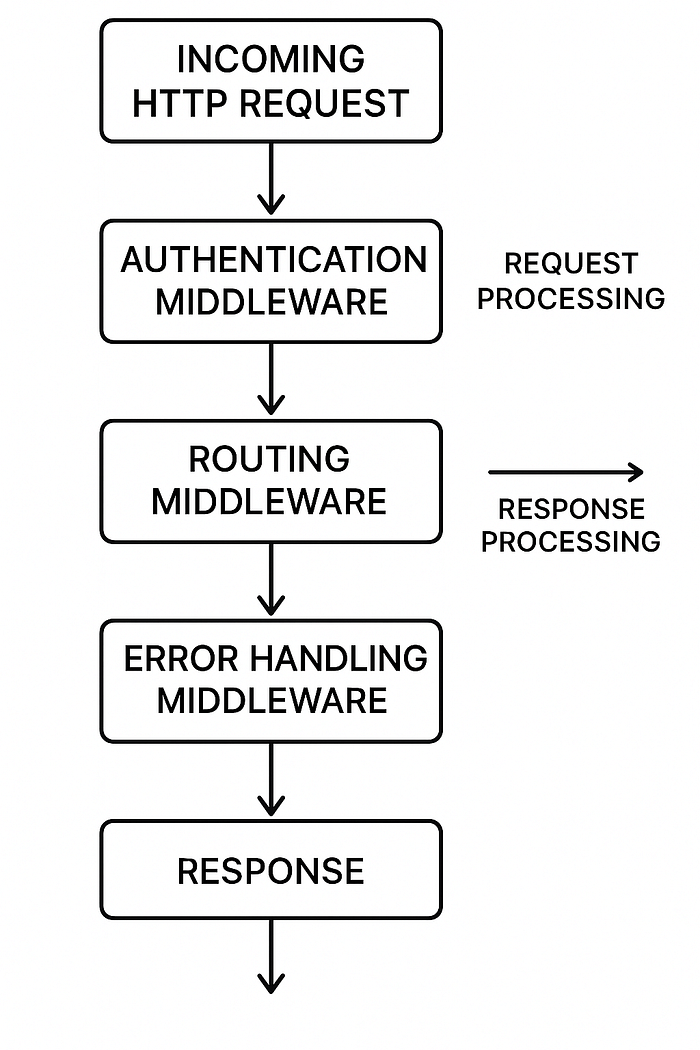
Middleware enables cross-cutting concerns like authentication, logging, and caching:
public interface IMiddleware
{
    Task<ApiResponse> InvokeAsync(ApiRequest request, Func<ApiRequest, Task<ApiResponse>> next);
}

public class MiddlewarePipeline
{
    private readonly List<IMiddleware> _middlewares = new List<IMiddleware>();

    public void Use(IMiddleware middleware)
    {
        _middlewares.Add(middleware);
    }

    public async Task<ApiResponse> ExecuteAsync(ApiRequest request, Func<ApiRequest, Task<ApiResponse>> finalHandler)
    {
        Func<ApiRequest, Task<ApiResponse>> pipeline = finalHandler;

        // Build pipeline in reverse order
        for (int i = _middlewares.Count - 1; i >= 0; i--)
        {
            var currentMiddleware = _middlewares[i];
            var nextHandler = pipeline;
            pipeline = (req) => currentMiddleware.InvokeAsync(req, nextHandler);
        }

        return await pipeline(request);
    }
}

// Example middleware implementations
public class RequestLoggingMiddleware : IMiddleware
{
    public async Task<ApiResponse> InvokeAsync(ApiRequest request, Func<ApiRequest, Task<ApiResponse>> next)
    {
        var stopwatch = Stopwatch.StartNew();
        Console.WriteLine($"[{DateTime.UtcNow:yyyy-MM-dd HH:mm:ss}] {request.Method} {request.Url.PathAndQuery} - Started");

        var response = await next(request);

        stopwatch.Stop();
        Console.WriteLine($"[{DateTime.UtcNow:yyyy-MM-dd HH:mm:ss}] {request.Method} {request.Url.PathAndQuery} - Completed in {stopwatch.ElapsedMilliseconds}ms (Status: {response.StatusCode})");

        return response;
    }
}

public class RateLimitingMiddleware : IMiddleware
{
    private readonly Dictionary<string, Queue<DateTime>> _requestHistory = new Dictionary<string, Queue<DateTime>>();
    private readonly int _maxRequests;
    private readonly TimeSpan _timeWindow;
    private readonly object _lock = new object();

    public RateLimitingMiddleware(int maxRequests = 100, TimeSpan timeWindow = default)
    {
        _maxRequests = maxRequests;
        _timeWindow = timeWindow == default ? TimeSpan.FromMinutes(1) : timeWindow;
    }

    public async Task<ApiResponse> InvokeAsync(ApiRequest request, Func<ApiRequest, Task<ApiResponse>> next)
    {
        var clientId = GetClientIdentifier(request);

        lock (_lock)
        {
            if (!_requestHistory.ContainsKey(clientId))
                _requestHistory[clientId] = new Queue<DateTime>();

            var clientRequests = _requestHistory[clientId];
            var cutoffTime = DateTime.UtcNow - _timeWindow;

            // Remove old requests
            while (clientRequests.Count > 0 && clientRequests.Peek() < cutoffTime)
                clientRequests.Dequeue();

            if (clientRequests.Count >= _maxRequests)
            {
                return new ApiResponse
                {
                    StatusCode = 429,
                    Body = JsonHelper.Serialize(new { error = "Rate limit exceeded", retryAfter = _timeWindow.TotalSeconds })
                };
            }

            clientRequests.Enqueue(DateTime.UtcNow);
        }

        return await next(request);
    }

    private string GetClientIdentifier(ApiRequest request)
    {
        // In a real application, you might use IP address, API key, or user ID
        return request.Headers.TryGetValue("X-Forwarded-For", out var forwardedFor) ? forwardedFor : "unknown";
    }
}
Step 10: Performance Optimization Techniques
The final step involves implementing performance optimizations that scale to enterprise levels:
public class PerformanceOptimizer
{
    // Simple in-memory cache implementation
    private readonly Dictionary<string, CacheItem> _cache = new Dictionary<string, CacheItem>();
    private readonly object _cacheLock = new object();

    public class CacheItem
    {
        public object Data { get; set; }
        public DateTime Expiry { get; set; }
    }

    public bool TryGetFromCache<T>(string key, out T value)
    {
        value = default(T);

        lock (_cacheLock)
        {
            if (_cache.TryGetValue(key, out var item) && DateTime.UtcNow < item.Expiry)
            {
                value = (T)item.Data;
                return true;
            }

            if (item != null) // Remove expired item
                _cache.Remove(key);
        }

        return false;
    }

    public void SetCache<T>(string key, T value, TimeSpan expiry)
    {
        lock (_cacheLock)
        {
            _cache[key] = new CacheItem
            {
                Data = value,
                Expiry = DateTime.UtcNow.Add(expiry)
            };
        }
    }
}

public class CompressionMiddleware : IMiddleware
{
    public async Task<ApiResponse> InvokeAsync(ApiRequest request, Func<ApiRequest, Task<ApiResponse>> next)
    {
        var response = await next(request);

        // Check if client accepts compression
        if (request.Headers.TryGetValue("Accept-Encoding", out var encoding) &&
            encoding.Contains("gzip") &&
            !string.IsNullOrEmpty(response.Body))
        {
            var compressed = CompressString(response.Body);
            if (compressed.Length < response.Body.Length) // Only compress if beneficial
            {
                response.Body = Convert.ToBase64String(compressed);
                response.Headers["Content-Encoding"] = "gzip";
                response.Headers["Content-Length"] = compressed.Length.ToString();
            }
        }

        return response;
    }

    private byte[] CompressString(string text)
    {
        var bytes = Encoding.UTF8.GetBytes(text);
        using var output = new MemoryStream();
        using (var gzip = new GZipStream(output, CompressionMode.Compress))
        {
            gzip.Write(bytes, 0, bytes.Length);
        }
        return output.ToArray();
    }
}

// Connection pooling for database operations
public class ConnectionPool
{
    private readonly Queue<IDbConnection> _pool = new Queue<IDbConnection>();
    private readonly int _maxSize;
    private readonly string _connectionString;
    private readonly object _lock = new object();

    public ConnectionPool(string connectionString, int maxSize = 10)
    {
        _connectionString = connectionString;
        _maxSize = maxSize;
    }

    public IDbConnection GetConnection()
    {
        lock (_lock)
        {
            if (_pool.Count > 0)
                return _pool.Dequeue();
        }

        // Create new connection if pool is empty
        return CreateConnection();
    }

    public void ReturnConnection(IDbConnection connection)
    {
        lock (_lock)
        {
            if (_pool.Count < _maxSize && connection.State == ConnectionState.Open)
                _pool.Enqueue(connection);
            else
                connection.Dispose();
        }
    }

    private IDbConnection CreateConnection()
    {
        // Implementation depends on your database provider
        // Example: return new SqlConnection(_connectionString);
        throw new NotImplementedException("Implement based on your database provider");
    }
}
Complete Integration and Testing
Here’s how to wire everything together in your main server class:
public class HttpAPIServer
{
    private HttpListener _listener;
    private readonly string _baseUrl = "http://localhost:8080/";
    private readonly ApiRouter _router;
    private readonly MiddlewarePipeline _pipeline;

    public HttpAPIServer()
    {
        _router = new ApiRouter();
        _pipeline = new MiddlewarePipeline();
        ConfigureRoutes();
        ConfigureMiddleware();
    }

    private void ConfigureRoutes()
    {
        _router.AddRoute("GET", "/api/users", UserController.GetAllUsers);
        _router.AddRoute("GET", "/api/users/{id}", UserController.GetUserById);
        _router.AddRoute("POST", "/api/users", UserController.CreateUser);
        _router.AddRoute("PUT", "/api/users/{id}", UserController.UpdateUser);
        _router.AddRoute("DELETE", "/api/users/{id}", UserController.DeleteUser);
    }

    private void ConfigureMiddleware()
    {
        _pipeline.Use(new RequestLoggingMiddleware());
        _pipeline.Use(new RateLimitingMiddleware(maxRequests: 100, TimeSpan.FromMinutes(1)));
        _pipeline.Use(new CompressionMiddleware());
    }

    public async Task StartAsync()
    {
        _listener = new HttpListener();
        _listener.Prefixes.Add(_baseUrl);
        _listener.Start();

        Console.WriteLine($"RESTful API Server started at {_baseUrl}");
        Console.WriteLine("Available endpoints:");
        Console.WriteLine("  GET    /api/users     - Get all users");
        Console.WriteLine("  GET    /api/users/{id} - Get user by ID");
        Console.WriteLine("  POST   /api/users     - Create new user");
        Console.WriteLine("  PUT    /api/users/{id} - Update user");
        Console.WriteLine("  DELETE /api/users/{id} - Delete user");
        Console.WriteLine("\n Press Ctrl+C to stop the server...");

        await ListenForRequestsAsync();
    }

    private async Task ProcessRequestAsync(HttpListenerContext context)
    {
        ApiRequest apiRequest = null;
        try
        {
            apiRequest = await RequestParser.ParseAsync(context.Request);

            var response = await _pipeline.ExecuteAsync(apiRequest, async (req) =>
            {
                return await _router.RouteAsync(req);
            });

            await SendResponseAsync(context.Response, response);
        }
        catch (Exception ex)
        {
            var errorResponse = await GlobalErrorHandler.HandleAsync(ex, apiRequest);
            await SendResponseAsync(context.Response, errorResponse);
        }
    }
}
Best Practices for Enterprise-Grade Performance
Scalability Strategies Used by Tech Giants
Major technology companies handle billions of API requests daily. Here are the proven strategies they employ:
1. Horizontal Scaling and Load Distribution
- Microservices Architecture: Break large APIs into smaller, independent services
- Load Balancing: Distribute requests across multiple server instances.
- Auto-scaling: Dynamically adjust server capacity based on traffic patterns
2. Advanced Caching Strategies
- Multi-layer Caching: Browser → CDN → Application → Database caching
- Cache Invalidation: Smart cache expiration based on data freshness requirements
- Content Delivery Networks (CDNs): Geographic distribution of static content
3. Database Optimization Techniques
- Connection Pooling: Reuse database connections to reduce overhead
- Query Optimization: Use indexes, avoid N+1 queries, implement pagination
- Database Sharding: Distribute data across multiple database instances
4. Asynchronous Processing
- Message Queues: Offload time-intensive operations to background workers
- Event-driven Architecture: Decouple services using publish-subscribe patterns
- Circuit Breaker Pattern: Prevent cascading failures in distributed systems
Resolving Common Performance Bottlenecks
Memory Management Optimization:
// Use object pooling for frequently created objects
public class ObjectPool<T> where T : class, new()
{
    private readonly ConcurrentQueue<T> _objects = new ConcurrentQueue<T>();
    private readonly Func<T> _objectGenerator;

    public ObjectPool(Func<T> objectGenerator = null)
    {
        _objectGenerator = objectGenerator ?? (() => new T());
    }

    public T Rent()
    {
        if (_objects.TryDequeue(out T item))
            return item;
        return _objectGenerator();
    }

    public void Return(T item)
    {
        _objects.Enqueue(item);
    }
}

// Use Span<T> for efficient string operations
public static string ProcessLargeString(string input)
{
    ReadOnlySpan<char> span = input.AsSpan();
    // Process without additional memory allocation
    return span.Slice(0, Math.Min(100, span.Length)).ToString();
}
Network Optimization Techniques:
- Compression: Use GZIP compression for responses larger than 1KB
- HTTP/2 Support: Implement multiplexing and server push capabilities
- Efficient Serialization: Choose binary formats for internal service communication
Monitoring and Diagnostics:
- Application Performance Monitoring (APM): Track response times, error rates, and throughput
- Structured Logging: Implement consistent logging for debugging and analytics
- Health Check Endpoints: Provide system status information for load balancers
Security Considerations for Production
While our implementation focused on core functionality, production APIs require robust security:
- Authentication & Authorization: Implement JWT tokens or OAuth 2.0
- Input Validation: Sanitize all incoming data to prevent injection attacks
- Rate Limiting: Prevent abuse with sophisticated throttling mechanisms
- HTTPS Enforcement: Always use TLS/SSL in production environments
- API Versioning: Maintain backward compatibility while evolving your API
The Power and Potential of RESTful APIs
Building a RESTful API from scratch has given you invaluable insights into the foundational technologies powering modern web applications. You now understand how HTTP protocols work at a fundamental level, how to efficiently parse and route requests, and how to implement the performance optimizations that keep services running smoothly under massive load.
Why This Knowledge Matters
Framework Independence: Understanding these core concepts makes you technology-agnostic. Whether you’re working with ASP.NET Core, Express.js, Django, or any other framework, the principles remain consistent.
Performance Debugging: When your production API faces performance issues, you’ll know exactly where to look and how to optimize at the protocol level.
Architecture Decisions: You can make informed choices about when to use frameworks versus custom implementations based on specific performance and scalability requirements.
The Trade-offs: Framework vs. Custom Implementation
Custom Implementation Pros:
- Complete Control: Every aspect of request processing is under your control
- Minimal Overhead: No framework abstractions reducing performance
- Learning Value: Deep understanding of HTTP and web server internals
- Customization: Tailor every component to your specific needs
Framework Implementation Pros:
- Rapid Development: Built-in features reduce development time significantly
- Battle-tested: Frameworks like ASP.NET Core handle edge cases you might miss
- Community Support: Extensive documentation, plugins, and community knowledge
- Security Features: Built-in protection against common vulnerabilities
Real-World Impact and Future Possibilities
The techniques you’ve learned scale from simple hobby projects to enterprise applications serving millions of users. Companies like Netflix, Uber, and Spotify use similar principles in their service architectures, though at much larger scales with additional layers of complexity.
Your Next Steps:
- Experiment with Database Integration: Replace the in-memory store with Entity Framework or Dapper
- Implement Authentication: Add JWT-based security to your API
- Deploy to Cloud: Experience the challenges of production deployment and monitoring
- Load Testing: Use tools like Apache JMeter to test your API under stress
- Microservices Evolution: Break your monolithic API into smaller, specialized services
The Endless Journey of API Excellence
RESTful APIs are more than just technical implementations, they’re the communication foundation that enables our interconnected digital world. Every mobile app notification, every real-time dashboard update, every seamless user experience relies on well-designed APIs working flawlessly behind the scenes.
As you continue your development journey, remember that great APIs are not just functiona, they’re intuitive, reliable, and performant. They anticipate user needs, handle errors gracefully, and scale effortlessly as demand grows.
The principles you’ve mastered today proper HTTP semantics, efficient data serialization, robust error handling, and performance optimization will serve you throughout your career, regardless of which specific technologies you encounter.
Keep building, keep optimizing, and keep pushing the boundaries of what’s possible with clean, efficient code. The digital world needs more developers who understand not just the “how” but the “why” behind the technologies they use.
Ready to take your API skills to the next level? Start by implementing one additional feature perhaps WebSocket support for real-time communications, or GraphQL endpoints for more flexible data querying. The foundation you’ve built is solid; now it’s time to see how high you can build upon it.
I hope you enjoyed reading this blog!
I’d love to hear your thoughts. please share your feedback or questions in the comments below and let me know if you’d like any clarifications on the topics covered. If you enjoyed this blog, don’t forget to like it and subscribe for more technology insights.
Stay tuned! In upcoming posts, I’ll be diving into advanced .NET topics such Job Scheduling, CLR Execution, ASP.NET Core detailed guide, Software architectures in detail, Authentication & Authorization Techniques and much more.
Thank you for joining me on this learning journey!