Modern enterprises face an unprecedented challenge: managing increasingly complex business processes while maintaining efficiency, compliance, and scalability. Organizations that fail to automate their workflows risk falling behind competitors who leverage technology to streamline operations, reduce errors, and accelerate decision-making. Workflow automation with .NET 8 emerges as a transformative solution, enabling businesses to orchestrate complex processes, integrate disparate systems, and maintain operational excellence at scale. This comprehensive analysis reveals how .NET 8’s advanced features, combined with ASP.NET Core’s robust infrastructure, create powerful automation capabilities that address real-world enterprise challenges while delivering measurable business value.
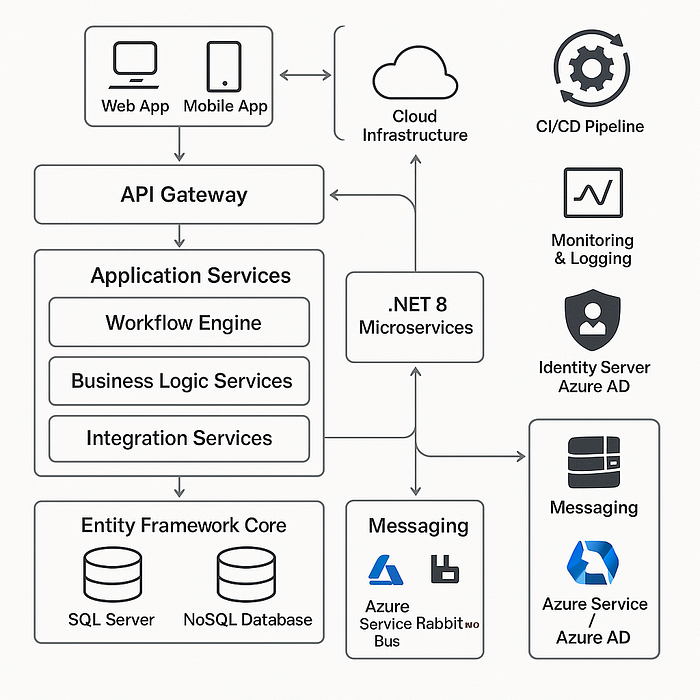
Why Workflow Automation Matters in Modern Enterprises
Enterprise operations today involve intricate networks of interconnected processes that span multiple departments, systems and stakeholders. Traditional manual approaches to managing these workflows create significant bottlenecks, introduce human errors and limit organizational agility. The imperative for automation stems from fundamental business pressures increasing customer expectations, regulatory compliance requirements, competitive market dynamics and the need for operational transparency.
Core Definitions and Terminology
Workflow automation represents a systematic approach to digitizing and orchestrating business processes through software-driven task coordination. In the .NET ecosystem, this translates to leveraging C# and ASP.NET Core capabilities to create intelligent process orchestration systems that can manage complex business logic, handle state transitions and coordinate activities across distributed systems.
Process orchestration refers to the centralized coordination of multiple services and tasks to achieve specific business outcomes. Unlike simple task automation, orchestration manages dependencies, handles exceptions, and ensures proper sequencing of activities across complex workflows. State management encompasses the persistence and tracking of process state throughout workflow execution, ensuring reliability and enabling long-running processes.
When and Why to Use Workflow Automation
Organizations should implement workflow automation when facing several key indicators like repetitive manual processes that consume significant human resources, multi-step approval chains that create delays, complex business rules that require consistent application and integration requirements across multiple systems. The technology becomes particularly valuable for processes involving document approvals, customer onboarding, order processing, compliance tracking and incident management.
Research indicates that 70% of organizations are actively piloting automation technologies, with successful implementations reporting 20–30% improvements in processing efficiency and significant reductions in operational costs. The decision to automate should consider process complexity, frequency of execution, error rates in manual processing, and the potential for standardization.
Enterprise Application Necessity
For enterprise applications, workflow automation transcends simple task automation to become a strategic enabler of business agility. Modern enterprises require automation frameworks that can handle millions of concurrent workflows, integrate with existing enterprise systems, provide comprehensive audit trails, and support complex business rules. The technology must also accommodate regulatory requirements, support multi-tenant scenarios, and enable real-time monitoring and analytics.
.NET 8 addresses these enterprise requirements through enhanced performance characteristics, improved memory management and advanced concurrency capabilities. The platform’s mature ecosystem provides robust integration points with enterprise systems while maintaining the flexibility to adapt to changing business requirements.
Problems Solved by Workflow Automation
-Business Process Inefficiencies
Traditional manual processes suffer from inherent inefficiencies that compound as organizations scale. Manual approval chains frequently create bottlenecks when key stakeholders are unavailable, leading to delayed decisions and frustrated customers. Research demonstrates that manual processes typically involve 40–60% non-value-added activities, including redundant data entry, status inquiries, and process coordination overhead.
Inconsistent process execution represents another critical challenge, where the same business process may be executed differently by various team members, leading to variable outcomes and compliance risks. Manual processes also lack comprehensive audit trails, making it difficult to identify improvement opportunities or demonstrate regulatory compliance.
-Manual Task Bottlenecks
Human resource constraints create significant bottlenecks in manual workflows, particularly during peak periods or when specialized expertise is required. Organizations frequently encounter situations where critical processes stall because specific individuals are unavailable, creating cascade effects throughout dependent activities.
Information handoff delays between different teams or departments represent another common bottleneck, where manual communication methods result in lost context, delayed responses, and increased error rates. These delays are particularly problematic in customer-facing processes where response time directly impacts satisfaction and retention.
-Scalability Challenges
Manual processes exhibit poor scalability characteristics, requiring proportional increases in human resources to handle growing workloads. Linear scalability constraints mean that doubling process volume typically requires doubling staff, creating unsustainable cost structures for growing organizations.
Quality degradation under load is another significant challenge, where increased process volume leads to higher error rates, reduced attention to detail, and compromised service quality. Manual processes also struggle with geographic distribution, as coordination across different time zones and locations introduces additional complexity and delays.
-Integration Complexities
Modern enterprises operate with numerous specialized systems, each optimized for specific functions but requiring coordination to deliver comprehensive business outcomes. System integration challenges arise when manual processes must bridge between different technologies, requiring human intervention to transfer data, synchronize states and coordinate activities.
Data consistency issues frequently emerge in manual integration scenarios, where the same information must be maintained across multiple systems without automated synchronization mechanisms. These inconsistencies can lead to conflicting reports, incorrect decisions, and operational confusion.
Core Concepts in Workflow Automation
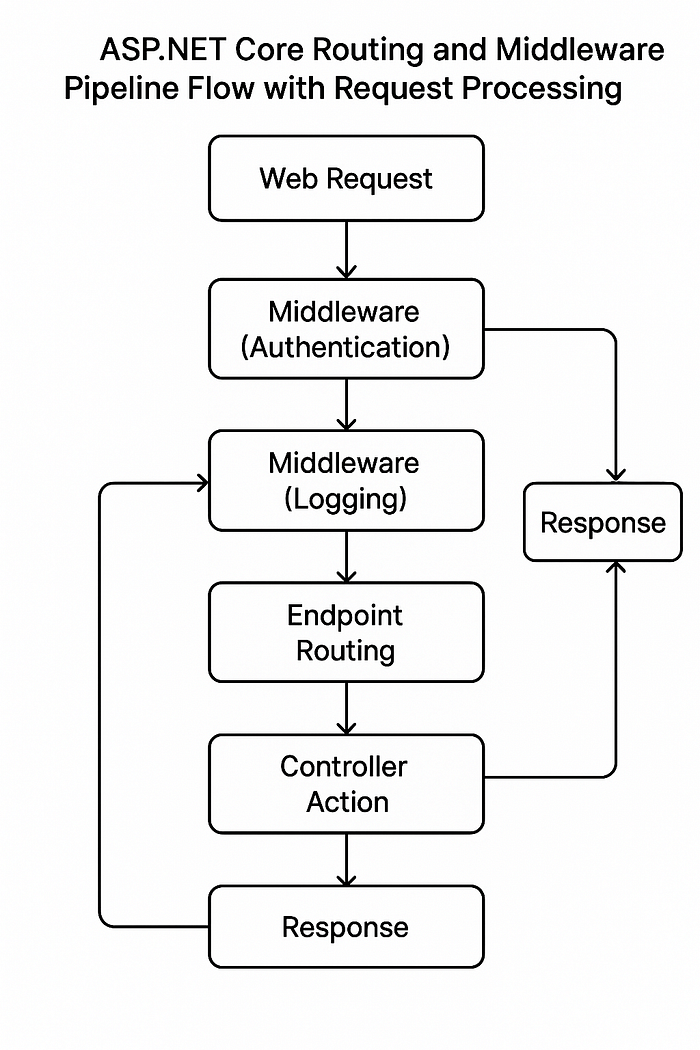
Understanding workflow automation requires mastering several fundamental concepts that form the foundation of effective process orchestration. These concepts work together to create robust, scalable and maintainable automation solutions.
-Process Orchestration
Process orchestration serves as the central nervous system of workflow automation, coordinating multiple activities, services and decision points to achieve specific business outcomes. Unlike simple task automation, orchestration manages complex dependencies, handles exceptions gracefully, and ensures proper sequencing across distributed systems.
The orchestration layer must handle both synchronous and asynchronous operations, coordinating database transactions, API calls, message processing and user interactions within a cohesive workflow. Modern orchestration engines support parallel execution paths, enabling workflows to optimize performance by executing independent activities simultaneously while maintaining dependency relationships.
Compensation logic represents a critical aspect of process orchestration, ensuring that partially completed workflows can be properly rolled back when errors occur. This becomes particularly important in distributed scenarios where different workflow steps may execute on separate systems or services.
-State Management
Effective state management ensures workflow reliability and enables long-running processes that may span hours, days, or even months. The state management system must persist workflow data, track progress through complex process flows, and maintain consistency across system failures and restarts.
Workflow state persistence involves storing not only the current position within a process but also the complete context necessary to resume execution after interruptions. This includes input data, intermediate results, decision outcomes, and environmental context that may influence subsequent processing.
State transition management controls how workflows move between different phases, ensuring that all prerequisites are met before advancing and that rollback scenarios are properly handled. Modern workflow engines implement sophisticated state machines that can handle complex branching logic, parallel paths, and conditional transitions.
-Event-Driven Architecture
Event-driven processing enables workflows to respond dynamically to external stimuli, creating more responsive and adaptive automation solutions. This approach allows workflows to react to business events, system notifications, timer expirations and user actions without constant polling or synchronous waiting.
Message-driven coordination facilitates loose coupling between workflow components, enabling better scalability and fault tolerance. Workflows can publish events when significant milestones are reached and subscribe to relevant business events to trigger appropriate actions.
Event sourcing patterns provide comprehensive audit trails while enabling workflows to rebuild state from historical events. This approach supports complex scenarios like process replay, state reconstruction after failures, and analytical reporting on workflow execution patterns.
-Task Coordination
Task coordination mechanisms ensure that complex workflows execute in the correct sequence while optimizing performance through parallel processing where appropriate. This involves managing task dependencies, handling resource contention, and coordinating activities across distributed systems.
Load balancing and distribution enables workflows to scale horizontally by distributing tasks across multiple processing nodes. Modern coordination systems can dynamically allocate resources based on current load and task characteristics.
Failure handling and retry logic provides resilience in distributed environments where individual tasks may fail due to transient issues. Sophisticated coordination systems implement exponential backoff, circuit breaker patterns, and dead letter queues to handle various failure scenarios gracefully.
ASP.NET Core Integration Architecture
Routing Implementation
ASP.NET Core provides two primary routing mechanisms that serve different use cases in workflow automation scenarios. Conventional routing offers centralized configuration suitable for standard CRUD operations and simple workflow endpoints.
Conventional Routing Implementation
// Program.cs - Conventional Routing Setup
var builder = WebApplication.CreateBuilder(args);

// Add services to the container
builder.Services.AddControllers();
builder.Services.AddControllersWithViews();

var app = builder.Build();

// Configure the HTTP request pipeline
if (!app.Environment.IsDevelopment())
{
    app.UseExceptionHandler("/Home/Error");
    app.UseHsts();
}

app.UseHttpsRedirection();
app.UseStaticFiles();
app.UseRouting();
app.UseAuthorization();

// Conventional routing configuration
app.MapControllerRoute(
    name: "default",
    pattern: "{controller=Home}/{action=Index}/{id?}");

// Custom route for workflow operations
app.MapControllerRoute(
    name: "workflow",
    pattern: "workflow/{action=Index}/{workflowId?}",
    defaults: new { controller = "Workflow" });

// API routing for workflow endpoints
app.MapControllerRoute(
    name: "api",
    pattern: "api/{controller}/{action=Index}/{id?}");

app.Run();
This conventional approach works well for standard workflow management interfaces where URL patterns follow predictable conventions. The configuration supports both web interface routing and API endpoints within a single application structure.
Custom Attribute-Based Routing
Attribute routing provides fine-grained control over URL patterns, making it ideal for RESTful workflow APIs and complex routing scenarios.
// Controllers/WorkflowController.cs - Custom Attribute Routing
using Microsoft.AspNetCore.Mvc;

[ApiController]
[Route("api/[controller]")]
public class WorkflowController : ControllerBase
{
    private readonly IWorkflowService _workflowService;

    public WorkflowController(IWorkflowService workflowService)
    {
        _workflowService = workflowService;
    }

    // GET: api/workflow
    [HttpGet]
    public async Task<IActionResult> GetAllWorkflows()
    {
        var workflows = await _workflowService.GetWorkflowsAsync();
        return Ok(workflows);
    }

    // GET: api/workflow/{id}
    [HttpGet("{id:guid}")]
    public async Task<IActionResult> GetWorkflow(Guid id)
    {
        var workflow = await _workflowService.GetWorkflowAsync(id);
        if (workflow == null)
            return NotFound();

        return Ok(workflow);
    }

    // POST: api/workflow/start
    [HttpPost("start")]
    public async Task<IActionResult> StartWorkflow([FromBody] StartWorkflowRequest request)
    {
        var workflowId = await _workflowService.StartWorkflowAsync(request);
        return CreatedAtAction(nameof(GetWorkflow), new { id = workflowId }, workflowId);
    }

    // PUT: api/workflow/{id}/complete/{taskId}
    [HttpPut("{id:guid}/complete/{taskId:guid}")]
    public async Task<IActionResult> CompleteTask(Guid id, Guid taskId,
        [FromBody] CompleteTaskRequest request)
    {
        await _workflowService.CompleteTaskAsync(id, taskId, request.Data);
        return NoContent();
    }

    // DELETE: api/workflow/{id}
    [HttpDelete("{id:guid}")]
    public async Task<IActionResult> CancelWorkflow(Guid id)
    {
        await _workflowService.CancelWorkflowAsync(id);
        return NoContent();
    }
}
This attribute-based approach provides explicit control over routing patterns while supporting complex workflow operations. The implementation demonstrates RESTful principles while accommodating workflow-specific operations like task completion and process cancellation.
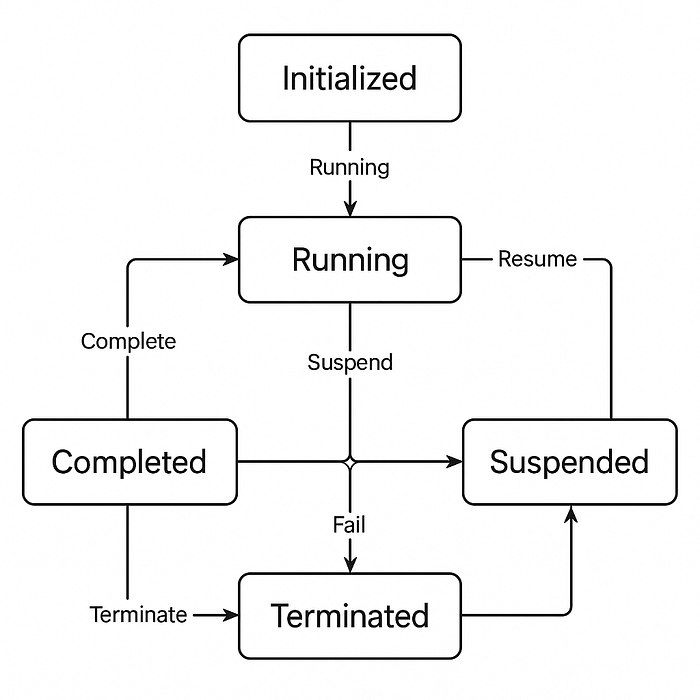
Middleware Components
ASP.NET Core middleware provides the perfect integration point for workflow automation, enabling cross-cutting concerns like authentication, logging, and request correlation.
Conventional Middleware Implementation
// Middleware/WorkflowMiddleware.cs - Conventional Middleware Implementation
public class WorkflowMiddleware
{
    private readonly RequestDelegate _next;
    private readonly ILogger<WorkflowMiddleware> _logger;
    private readonly IWorkflowEngine _workflowEngine;

    public WorkflowMiddleware(RequestDelegate next,
        ILogger<WorkflowMiddleware> logger,
        IWorkflowEngine workflowEngine)
    {
        _next = next;
        _logger = logger;
        _workflowEngine = workflowEngine;
    }

    public async Task InvokeAsync(HttpContext context)
    {
        var stopwatch = Stopwatch.StartNew();

        try
        {
            // Pre-processing: Log request details
            _logger.LogInformation("Processing request: {Method} {Path} at {Time}",
                context.Request.Method,
                context.Request.Path,
                DateTime.UtcNow);

            // Check if this is a workflow-related request
            if (IsWorkflowRequest(context))
            {
                // Add workflow context to the request
                context.Items["IsWorkflowRequest"] = true;
                context.Items["WorkflowStartTime"] = DateTime.UtcNow;

                // Validate workflow permissions
                if (!await ValidateWorkflowPermissions(context))
                {
                    context.Response.StatusCode = 403;
                    await context.Response.WriteAsync("Insufficient permissions for workflow operations");
                    return;
                }
            }

            // Continue to next middleware
            await _next(context);

            // Post-processing: Handle workflow completion
            if (context.Items.ContainsKey("WorkflowCompleted"))
            {
                await HandleWorkflowCompletion(context);
            }
        }
        catch (Exception ex)
        {
            _logger.LogError(ex, "Error processing workflow request");
            await HandleWorkflowError(context, ex);
        }
        finally
        {
            stopwatch.Stop();
            _logger.LogInformation("Request completed in {ElapsedMilliseconds}ms",
                stopwatch.ElapsedMilliseconds);
        }
    }

    private static bool IsWorkflowRequest(HttpContext context)
    {
        return context.Request.Path.StartsWithSegments("/api/workflow") ||
               context.Request.Path.StartsWithSegments("/workflow");
    }

    private async Task<bool> ValidateWorkflowPermissions(HttpContext context)
    {
        // Implement permission validation logic
        var user = context.User;
        if (user?.Identity?.IsAuthenticated == true)
        {
            return await _workflowEngine.ValidateUserPermissionsAsync(user.Identity.Name);
        }
        return false;
    }

    private async Task HandleWorkflowCompletion(HttpContext context)
    {
        // Handle workflow completion logic
        var workflowId = context.Items["WorkflowId"]?.ToString();
        if (!string.IsNullOrEmpty(workflowId))
        {
            await _workflowEngine.NotifyWorkflowCompletionAsync(workflowId);
        }
    }

    private async Task HandleWorkflowError(HttpContext context, Exception exception)
    {
        context.Response.StatusCode = 500;
        var response = new { error = "An error occurred processing the workflow", details = exception.Message };
        var json = JsonSerializer.Serialize(response);
        context.Response.ContentType = "application/json";
        await context.Response.WriteAsync(json);
    }
}

// Extension method for easier registration
public static class WorkflowMiddlewareExtensions
{
    public static IApplicationBuilder UseWorkflowMiddleware(this IApplicationBuilder builder)
    {
        return builder.UseMiddleware<WorkflowMiddleware>();
    }
}
The conventional middleware approach provides comprehensive request processing capabilities while integrating seamlessly with workflow operations. This implementation demonstrates proper error handling, logging and performance monitoring patterns essential for production workflow systems.
Custom IMiddleware Implementation
For more sophisticated scenarios requiring dependency injection and advanced configuration, the IMiddleware interface provides enhanced capabilities.
// Middleware/CustomWorkflowMiddleware.cs - IMiddleware Implementation
public class CustomWorkflowMiddleware : IMiddleware
{
    private readonly ILogger<CustomWorkflowMiddleware> _logger;
    private readonly IWorkflowMetrics _metrics;
    private readonly IWorkflowCache _cache;

    public CustomWorkflowMiddleware(
        ILogger<CustomWorkflowMiddleware> logger,
        IWorkflowMetrics metrics,
        IWorkflowCache cache)
    {
        _logger = logger;
        _metrics = metrics;
        _cache = cache;
    }

    public async Task InvokeAsync(HttpContext context, RequestDelegate next)
    {
        var requestId = Guid.NewGuid().ToString();
        context.Items["RequestId"] = requestId;

        using var scope = _logger.BeginScope(new Dictionary<string, object>
        {
            ["RequestId"] = requestId,
            ["RequestPath"] = context.Request.Path,
            ["RequestMethod"] = context.Request.Method
        });

        // Performance monitoring
        using var activity = WorkflowActivitySource.StartActivity("WorkflowRequest");
        activity?.SetTag("request.method", context.Request.Method);
        activity?.SetTag("request.path", context.Request.Path);

        var stopwatch = Stopwatch.StartNew();

        try
        {
            // Request rate limiting for workflow operations
            if (IsWorkflowApiRequest(context))
            {
                if (!await CheckRateLimit(context))
                {
                    context.Response.StatusCode = 429;
                    await context.Response.WriteAsync("Rate limit exceeded");
                    return;
                }

                // Add workflow correlation ID
                var correlationId = context.Request.Headers["X-Correlation-ID"].FirstOrDefault()
                    ?? Guid.NewGuid().ToString();
                context.Items["CorrelationId"] = correlationId;
                context.Response.Headers.Add("X-Correlation-ID", correlationId);
            }

            // Cache workflow data if applicable
            var cacheKey = GenerateCacheKey(context);
            if (!string.IsNullOrEmpty(cacheKey) && context.Request.Method == HttpMethods.Get)
            {
                var cachedResponse = await _cache.GetAsync(cacheKey);
                if (cachedResponse != null)
                {
                    context.Response.ContentType = "application/json";
                    await context.Response.WriteAsync(cachedResponse);
                    _metrics.IncrementCacheHit();
                    return;
                }
            }

            await next(context);

            // Cache successful GET responses
            if (context.Response.StatusCode == 200 &&
                context.Request.Method == HttpMethods.Get &&
                !string.IsNullOrEmpty(cacheKey))
            {
                // Note: In real implementation, you'd need to capture the response body
                // This is simplified for demonstration
                await CacheResponse(cacheKey, context);
            }

            _metrics.RecordRequestDuration(stopwatch.ElapsedMilliseconds);
            activity?.SetTag("response.status_code", context.Response.StatusCode.ToString());
        }
        catch (Exception ex)
        {
            _logger.LogError(ex, "Unhandled exception in workflow middleware");
            _metrics.IncrementErrorCount();

            activity?.SetStatus(ActivityStatusCode.Error, ex.Message);

            if (!context.Response.HasStarted)
            {
                context.Response.StatusCode = 500;
                await context.Response.WriteAsync("Internal server error");
            }
        }
        finally
        {
            stopwatch.Stop();
            _logger.LogInformation("Request processed in {Duration}ms with status {StatusCode}",
                stopwatch.ElapsedMilliseconds, context.Response.StatusCode);
        }
    }

    private static bool IsWorkflowApiRequest(HttpContext context)
    {
        return context.Request.Path.StartsWithSegments("/api/workflow");
    }

    private async Task<bool> CheckRateLimit(HttpContext context)
    {
        var clientId = GetClientId(context);
        var key = $"rate_limit:{clientId}";

        var current = await _cache.GetAsync<int?>(key);
        if (current >= 100) // 100 requests per minute
        {
            return false;
        }

        await _cache.SetAsync(key, (current ?? 0) + 1, TimeSpan.FromMinutes(1));
        return true;
    }

    private static string GetClientId(HttpContext context)
    {
        return context.User?.Identity?.Name ??
               context.Connection.RemoteIpAddress?.ToString() ??
               "anonymous";
    }

    private static string GenerateCacheKey(HttpContext context)
    {
        if (context.Request.Method != HttpMethods.Get)
            return null;

        var path = context.Request.Path.Value;
        var query = context.Request.QueryString.Value;
        var user = context.User?.Identity?.Name ?? "anonymous";

        return $"workflow_cache:{user}:{path}{query}";
    }

    private async Task CacheResponse(string cacheKey, HttpContext context)
    {
        // In a real implementation, you would capture the response body
        // This is a simplified version
        var cacheValue = $"{{\"cached\": true, \"timestamp\": \"{DateTime.UtcNow:O}\"}}";
        await _cache.SetAsync(cacheKey, cacheValue, TimeSpan.FromMinutes(5));
        _metrics.IncrementCacheMiss();
    }
}

// Registration in Program.cs
public static class ServiceCollectionExtensions
{
    public static IServiceCollection AddCustomWorkflowMiddleware(this IServiceCollection services)
    {
        services.AddScoped<CustomWorkflowMiddleware>();
        return services;
    }
}
This advanced middleware implementation demonstrates enterprise-grade features including rate limiting, caching, distributed tracing, and comprehensive monitoring. The solution provides the foundation for scalable workflow automation systems that can handle high-volume enterprise workloads.
Real-World Implementation: Order Processing Workflow
To demonstrate practical workflow automation implementation, consider a comprehensive order processing system that integrates multiple business functions while showcasing .NET 8 and ASP.NET Core capabilities.
Step-by-Step Use Case Implementation
The order processing workflow encompasses validation, inventory checking, payment processing, approval workflows and fulfillment coordination. This real-world scenario demonstrates how workflow automation handles complex business logic while maintaining system reliability and performance.
// Models/OrderProcessingWorkflow.cs - Complete Use Case Implementation
public class OrderProcessingWorkflow
{
    public class OrderData
    {
        public Guid OrderId { get; set; }
        public string CustomerId { get; set; }
        public decimal Amount { get; set; }
        public List<OrderItem> Items { get; set; } = new();
        public string Status { get; set; } = "Created";
        public DateTime CreatedAt { get; set; } = DateTime.UtcNow;
        public string ApprovalStatus { get; set; } = "Pending";
    }

    public class OrderItem
    {
        public string ProductId { get; set; }
        public int Quantity { get; set; }
        public decimal Price { get; set; }
    }
}

// Services/OrderWorkflowService.cs
public interface IOrderWorkflowService
{
    Task<Guid> StartOrderProcessingAsync(OrderData orderData);
    Task CompleteInventoryCheckAsync(Guid workflowId, bool inventoryAvailable);
    Task CompletePaymentProcessingAsync(Guid workflowId, bool paymentSuccessful);
    Task CompleteApprovalAsync(Guid workflowId, bool approved);
    Task<OrderProcessingStatus> GetWorkflowStatusAsync(Guid workflowId);
}

public class OrderWorkflowService : IOrderWorkflowService
{
    private readonly IWorkflowEngine _workflowEngine;
    private readonly IInventoryService _inventoryService;
    private readonly IPaymentService _paymentService;
    private readonly INotificationService _notificationService;
    private readonly ILogger<OrderWorkflowService> _logger;

    public OrderWorkflowService(
        IWorkflowEngine workflowEngine,
        IInventoryService inventoryService,
        IPaymentService paymentService,
        INotificationService notificationService,
        ILogger<OrderWorkflowService> logger)
    {
        _workflowEngine = workflowEngine;
        _inventoryService = inventoryService;
        _paymentService = paymentService;
        _notificationService = notificationService;
        _logger = logger;
    }

    public async Task<Guid> StartOrderProcessingAsync(OrderData orderData)
    {
        _logger.LogInformation("Starting order processing workflow for order {OrderId}", orderData.OrderId);

        var workflowId = await _workflowEngine.StartWorkflowAsync("OrderProcessing", orderData);

        // Step 1: Validate Order
        await ValidateOrderAsync(workflowId, orderData);

        return workflowId;
    }

    private async Task ValidateOrderAsync(Guid workflowId, OrderData orderData)
    {
        try
        {
            // Business validation logic
            if (orderData.Amount <= 0 || !orderData.Items.Any())
            {
                await _workflowEngine.CompleteTaskAsync(workflowId, "ValidateOrder",
                    new { IsValid = false, Reason = "Invalid order data" });
                return;
            }

            // Check customer validation
            var customerValid = await ValidateCustomerAsync(orderData.CustomerId);
            if (!customerValid)
            {
                await _workflowEngine.CompleteTaskAsync(workflowId, "ValidateOrder",
                    new { IsValid = false, Reason = "Invalid customer" });
                return;
            }

            await _workflowEngine.CompleteTaskAsync(workflowId, "ValidateOrder",
                new { IsValid = true });

            // Trigger next step
            await CheckInventoryAsync(workflowId, orderData);
        }
        catch (Exception ex)
        {
            _logger.LogError(ex, "Error validating order {OrderId}", orderData.OrderId);
            await _workflowEngine.HandleErrorAsync(workflowId, "ValidateOrder", ex);
        }
    }

    private async Task CheckInventoryAsync(Guid workflowId, OrderData orderData)
    {
        try
        {
            var inventoryResults = new List<InventoryCheckResult>();

            foreach (var item in orderData.Items)
            {
                var available = await _inventoryService.CheckAvailabilityAsync(item.ProductId, item.Quantity);
                inventoryResults.Add(new InventoryCheckResult
                {
                    ProductId = item.ProductId,
                    RequestedQuantity = item.Quantity,
                    AvailableQuantity = available,
                    IsSufficient = available >= item.Quantity
                });
            }

            var allItemsAvailable = inventoryResults.All(r => r.IsSufficient);

            await _workflowEngine.CompleteTaskAsync(workflowId, "CheckInventory", new
            {
                InventoryAvailable = allItemsAvailable,
                Results = inventoryResults
            });

            if (allItemsAvailable)
            {
                await ProcessPaymentAsync(workflowId, orderData);
            }
            else
            {
                await HandleInsufficientInventoryAsync(workflowId, orderData, inventoryResults);
            }
        }
        catch (Exception ex)
        {
            _logger.LogError(ex, "Error checking inventory for order {OrderId}", orderData.OrderId);
            await _workflowEngine.HandleErrorAsync(workflowId, "CheckInventory", ex);
        }
    }

    public async Task CompleteInventoryCheckAsync(Guid workflowId, bool inventoryAvailable)
    {
        if (inventoryAvailable)
        {
            var orderData = await _workflowEngine.GetWorkflowDataAsync<OrderData>(workflowId);
            await ProcessPaymentAsync(workflowId, orderData);
        }
        else
        {
            await _workflowEngine.CompleteWorkflowAsync(workflowId, "Cancelled", "Insufficient inventory");
        }
    }

    private async Task ProcessPaymentAsync(Guid workflowId, OrderData orderData)
    {
        try
        {
            var paymentRequest = new PaymentRequest
            {
                OrderId = orderData.OrderId,
                Amount = orderData.Amount,
                CustomerId = orderData.CustomerId
            };

            var paymentResult = await _paymentService.ProcessPaymentAsync(paymentRequest);

            await _workflowEngine.CompleteTaskAsync(workflowId, "ProcessPayment", paymentResult);

            if (paymentResult.IsSuccessful)
            {
                if (orderData.Amount > 1000) // Requires approval for large orders
                {
                    await RequestApprovalAsync(workflowId, orderData);
                }
                else
                {
                    await FulfillOrderAsync(workflowId, orderData);
                }
            }
            else
            {
                await HandlePaymentFailureAsync(workflowId, orderData, paymentResult);
            }
        }
        catch (Exception ex)
        {
            _logger.LogError(ex, "Error processing payment for order {OrderId}", orderData.OrderId);
            await _workflowEngine.HandleErrorAsync(workflowId, "ProcessPayment", ex);
        }
    }

    public async Task CompletePaymentProcessingAsync(Guid workflowId, bool paymentSuccessful)
    {
        if (paymentSuccessful)
        {
            var orderData = await _workflowEngine.GetWorkflowDataAsync<OrderData>(workflowId);
            await FulfillOrderAsync(workflowId, orderData);
        }
        else
        {
            await _workflowEngine.CompleteWorkflowAsync(workflowId, "Failed", "Payment processing failed");
        }
    }

    private async Task RequestApprovalAsync(Guid workflowId, OrderData orderData)
    {
        try
        {
            await _notificationService.SendApprovalRequestAsync(orderData);

            await _workflowEngine.CompleteTaskAsync(workflowId, "RequestApproval", new
            {
                ApprovalRequested = true,
                RequestedAt = DateTime.UtcNow
            });

            // Set a timer for approval timeout
            await _workflowEngine.SetTimerAsync(workflowId, "ApprovalTimeout", TimeSpan.FromHours(24));
        }
        catch (Exception ex)
        {
            _logger.LogError(ex, "Error requesting approval for order {OrderId}", orderData.OrderId);
            await _workflowEngine.HandleErrorAsync(workflowId, "RequestApproval", ex);
        }
    }

    public async Task CompleteApprovalAsync(Guid workflowId, bool approved)
    {
        if (approved)
        {
            var orderData = await _workflowEngine.GetWorkflowDataAsync<OrderData>(workflowId);
            await FulfillOrderAsync(workflowId, orderData);
        }
        else
        {
            await _workflowEngine.CompleteWorkflowAsync(workflowId, "Rejected", "Order approval denied");
        }
    }

    private async Task FulfillOrderAsync(Guid workflowId, OrderData orderData)
    {
        try
        {
            // Reserve inventory
            await _inventoryService.ReserveInventoryAsync(orderData.Items);

            // Generate fulfillment tasks
            var fulfillmentId = await GenerateFulfillmentTasksAsync(orderData);

            await _workflowEngine.CompleteTaskAsync(workflowId, "FulfillOrder", new
            {
                FulfillmentId = fulfillmentId,
                Status = "InFulfillment"
            });

            // Send confirmation
            await _notificationService.SendOrderConfirmationAsync(orderData);

            await _workflowEngine.CompleteWorkflowAsync(workflowId, "Completed", "Order processing completed successfully");
        }
        catch (Exception ex)
        {
            _logger.LogError(ex, "Error fulfilling order {OrderId}", orderData.OrderId);
            await _workflowEngine.HandleErrorAsync(workflowId, "FulfillOrder", ex);
        }
    }

    public async Task<OrderProcessingStatus> GetWorkflowStatusAsync(Guid workflowId)
    {
        var workflowStatus = await _workflowEngine.GetWorkflowStatusAsync(workflowId);
        return new OrderProcessingStatus
        {
            WorkflowId = workflowId,
            Status = workflowStatus.Status,
            CurrentStep = workflowStatus.CurrentStep,
            CompletedSteps = workflowStatus.CompletedSteps,
            StartedAt = workflowStatus.StartedAt,
            LastUpdated = workflowStatus.LastUpdated
        };
    }

    // Helper methods
    private async Task<bool> ValidateCustomerAsync(string customerId)
    {
        // Customer validation logic
        return !string.IsNullOrEmpty(customerId);
    }

    private async Task HandleInsufficientInventoryAsync(Guid workflowId, OrderData orderData, List<InventoryCheckResult> results)
    {
        await _notificationService.SendInventoryShortageNotificationAsync(orderData, results);
        await _workflowEngine.CompleteWorkflowAsync(workflowId, "OnHold", "Waiting for inventory replenishment");
    }

    private async Task HandlePaymentFailureAsync(Guid workflowId, OrderData orderData, PaymentResult paymentResult)
    {
        await _notificationService.SendPaymentFailureNotificationAsync(orderData, paymentResult);
        await _workflowEngine.CompleteWorkflowAsync(workflowId, "Failed", $"Payment failed: {paymentResult.FailureReason}");
    }

    private async Task<Guid> GenerateFulfillmentTasksAsync(OrderData orderData)
    {
        // Generate fulfillment workflow or tasks
        return Guid.NewGuid(); // Simplified
    }
}

// Supporting classes
public class InventoryCheckResult
{
    public string ProductId { get; set; }
    public int RequestedQuantity { get; set; }
    public int AvailableQuantity { get; set; }
    public bool IsSufficient { get; set; }
}

public class PaymentRequest
{
    public Guid OrderId { get; set; }
    public decimal Amount { get; set; }
    public string CustomerId { get; set; }
}

public class PaymentResult
{
    public bool IsSuccessful { get; set; }
    public string TransactionId { get; set; }
    public string FailureReason { get; set; }
}

public class OrderProcessingStatus
{
    public Guid WorkflowId { get; set; }
    public string Status { get; set; }
    public string CurrentStep { get; set; }
    public List<string> CompletedSteps { get; set; } = new();
    public DateTime StartedAt { get; set; }
    public DateTime LastUpdated { get; set; }
}
This comprehensive implementation demonstrates how workflow automation coordinates complex business processes while maintaining proper error handling, logging and state management. The solution showcases integration patterns that work effectively in real enterprise environments.
Performance Optimization and Best Practices
Enterprise workflow automation systems must handle significant scale while maintaining optimal performance characteristics. Success requires implementing proven optimization strategies and architectural patterns used by industry leaders.
-Memory Management and Resource Optimization
- Efficient memory management forms the foundation of high-performance workflow systems. .NET 8 introduces significant improvements in garbage collection and memory allocation patterns that directly benefit workflow automation scenarios.
- Object pooling reduces allocation pressure by reusing expensive objects like database connections, HTTP clients, and large data structures. For workflow engines processing thousands of concurrent instances, object pooling can reduce memory allocation by 60–80% while improving throughput.
- Span<T> and Memory<T> provide stack-allocated alternatives to heap allocations for temporary data processing, particularly beneficial in workflow engines that process large amounts of serialized data. These types enable zero-allocation scenarios for common workflow operations like data transformation and validation.
-Asynchronous Programming Excellence
- Comprehensive async/await implementation throughout the workflow pipeline prevents thread pool starvation and improves system scalability. Research indicates that properly implemented asynchronous patterns can increase system throughput by 300–500% compared to synchronous equivalents.
- ConfigureAwait(false) usage in library code prevents deadlocks and improves performance by avoiding unnecessary context switching. This practice becomes critical in workflow engines where operations may span multiple threads and execution contexts.
- ValueTask optimization for frequently called methods reduces allocation overhead while maintaining asynchronous semantics. Workflow engines benefit significantly from ValueTask usage in hot paths like state transitions and event processing.
-Caching and Data Access Strategies
- Multi-level caching architectures provide dramatic performance improvements for workflow systems. Organizations report 70–90% reduction in database load through effective caching strategies.
- Distributed caching with Redis enables workflow engines to share state across multiple instances while providing sub-millisecond data access. This approach supports horizontal scaling while maintaining data consistency across the workflow cluster.
- Database optimization techniques including connection pooling, query optimization, and bulk operations significantly improve workflow performance. Modern workflow engines implement specialized data access patterns that can process 10,000+ workflow instances per second.
Bottleneck Identification and Resolution
- Application Performance Monitoring (APM) tools provide critical insights into workflow system performance characteristics. Leading organizations implement comprehensive monitoring that tracks workflow execution times, resource utilization, and error rates across the entire system.
- Distributed tracing with OpenTelemetry enables detailed analysis of complex workflow execution paths, helping identify performance bottlenecks in multi-service architectures. This visibility becomes essential for optimizing workflow systems that integrate with numerous external services.
- Common performance bottlenecks in workflow systems include database connection exhaustion, inefficient serialization, excessive logging overhead, and suboptimal middleware ordering. Systematic analysis and resolution of these issues typically yields 50–200% performance improvements.
Enterprise Scalability Patterns
- Microservices architecture enables workflow systems to scale individual components independently based on load characteristics. Organizations successfully operating at Amazon and Google scale implement this pattern to handle millions of concurrent workflows.
- Event-driven architecture with message queues provides loose coupling and horizontal scalability for workflow systems. This approach enables workflow engines to process events asynchronously while maintaining system resilience.
- Auto-scaling strategies based on workflow queue depth, system utilization, and response time metrics ensure optimal resource utilization. Modern cloud platforms enable workflow systems to scale from hundreds to millions of workflow instances automatically.
Enterprise-Level Optimization Strategies
Industry leaders like Amazon, Google, and Microsoft implement sophisticated optimization strategies that provide valuable guidance for enterprise workflow systems:
- Amazon’s approach emphasizes service-oriented architecture with clear API contracts, extensive caching at multiple layers, auto-scaling based on demand patterns, circuit breakers for fault tolerance and comprehensive monitoring and alerting.
- Google’s practices include microservices with strong isolation boundaries, event-driven processing with pub/sub patterns, efficient resource utilization with containerization, machine learning for performance optimization, and global load balancing and traffic routing.
- Microsoft’s strategies focus on cloud-first architecture with Azure services, containerization with container instances, event-driven workflows with Service Bus, AI-powered insights and monitoring, and zero-downtime deployment strategies.
Advantages, Limitations, and Alternatives
-Workflow Automation Benefits
- Implementing workflow automation with .NET 8 provides significant operational advantages that directly impact business performance. Organizations report reduced manual errors and increased consistency as primary benefits, with error rates typically decreasing by 80–95% compared to manual processes.
- Improved process visibility and auditability enables organizations to demonstrate compliance with regulatory requirements while providing real-time insights into operational performance. This transparency becomes particularly valuable for industries with strict audit requirements where manual processes create compliance risks.
- Enhanced scalability and flexibility allows organizations to handle growing workloads without proportional increases in human resources. Automated workflows can scale to handle thousands of concurrent processes while maintaining consistent performance characteristics.
-Implementation Challenges
- Initial setup complexity and learning curve represents the primary barrier to workflow automation adoption. Organizations typically require 3–6 months to achieve full implementation proficiency, though this investment delivers long-term operational benefits.
- Potential over-engineering for simple processes can occur when organizations attempt to automate every business process without considering cost-benefit ratios. Successful implementations focus on high-value, repetitive processes that deliver measurable returns on automation investment.
- Dependency on technology infrastructure requires organizations to maintain robust IT capabilities and implement proper backup and recovery procedures. This dependency becomes particularly critical for mission-critical workflows where downtime creates significant business impact.
Alternative Solutions and Technologies
- Azure Logic Apps provides cloud-based workflow automation with extensive connector libraries and visual design capabilities. This solution works well for organizations preferring managed services over custom development.
- Power Automate offers low-code workflow automation integrated with Microsoft’s ecosystem, suitable for business users requiring simple automation capabilities. The platform provides pre-built templates and connectors for common business scenarios.
- Camunda BPM delivers sophisticated business process management capabilities with strong enterprise features and BPMN modeling support. Organizations requiring complex process orchestration often choose Camunda for its advanced workflow capabilities.
- Elsa Workflows provides open-source .NET workflow capabilities with visual design tools and comprehensive programming interfaces. This solution offers flexibility and cost-effectiveness for organizations comfortable with open-source technologies.
- Apache Airflow excels in data pipeline orchestration and ETL workflow automation, particularly popular in data engineering environments. Organizations with significant data processing requirements often implement Airflow alongside business workflow engines.
The choice between alternatives depends on organizational requirements including technical expertise, budget constraints, integration needs, and long-term strategic goals. Custom .NET implementations provide maximum flexibility and control but require greater development investment compared to managed services or third-party solutions.
Conclusion: The Future of Enterprise Automation
Workflow automation with .NET 8 represents more than technological advancement it embodies a strategic transformation in how modern enterprises operate. Organizations that successfully implement comprehensive workflow automation gain significant competitive advantages through improved efficiency, reduced costs, enhanced compliance, and greater operational agility. The convergence of .NET 8’s performance improvements, ASP.NET Core’s robust infrastructure, and mature workflow engines creates unprecedented opportunities for building enterprise-scale automation solutions that can handle millions of concurrent workflows while maintaining sub-second response times.
The evidence overwhelmingly demonstrates that workflow automation is no longer optional for competitive enterprises. Organizations implementing these technologies report 20–30% improvements in operational efficiency, 80–95% reduction in manual errors, and significant cost savings through reduced human intervention requirements. As business complexity continues increasing and customer expectations evolve, the ability to rapidly adapt and optimize business processes through automated workflows becomes a critical success factor.
The journey toward comprehensive workflow automation requires careful planning, proper technical implementation, and organizational change management. However, the investment delivers compounding returns as automated processes become more sophisticated and organizations develop expertise in process optimization. Embrace workflow automation with .NET 8 today, and position your organization at the forefront of the digital transformation revolution that is reshaping how businesses operate in the modern economy.
I hope you enjoyed reading this blog!
I’d love to hear your thoughts. please share your feedback or questions in the comments below and let me know if you’d like any clarifications on the topics covered. If you enjoyed this blog, don’t forget to like it and subscribe for more technology insights.
Stay tuned! In upcoming posts, I’ll be diving into advanced .NET topics such Job Scheduling, CLR Execution, ASP.NET Core detailed guide, Weekly DB Projects, Authentication & Authorization Techniques and much more.
Thank you for joining me on this learning journey!