Attention .NET developers: Are you wrestling with cumbersome native libraries or outdated COM components and unsure how to blend them into your modern C# projects? You’re not alone — over 60% of enterprise apps rely on legacy systems. In this guide, you’ll discover seven must-know interoperability strategies that will turbocharge performance, shrink technical debt, and help you future-proof your .NET ecosystem — all without a massive rewrite.
1. Why We Need Interoperability in .NET
Interoperability connects managed .NET code with unmanaged libraries (C/C++/Rust) or legacy COM components, preserving critical functionality while boosting performance and extending code lifespans — even across cross-platform .NET environments.
Key Advantages at a Glance
- Performance
Tap into optimized native libraries to offload CPU-heavy tasks. - Maintainability
Reuse proven, stable code rather than reinventing the wheel. - Scalability
Evolve your application with microservices or hybrid solutions. - Cost Savings
Skip expensive rewrites by integrating existing code via C# interoperability.
Fun Fact: Up to 70% of enterprise .NET applications rely on some form of interoperability for specialized tasks like mixed-mode assemblies or advanced computations.
2. Choosing the Right Approach: A Decision-Making Framework
Not all interop methods are created equal. Evaluate your needs based on:
- Performance Requirements
- High throughput? Consider P/Invoke or mixed-mode assemblies (C++/CLI).
- Cross-platform? REST or gRPC might be simpler, albeit with network overhead.
2. Complexity vs. Simplicity
- Minimal OS calls? P/Invoke is straightforward.
- Large C++ codebases? Mixed-mode can be neater.
3. Security & Isolation
- Native code can be riskier—test thoroughly.
- Service-based solutions (e.g., REST/gRPC) sandbox issues via network boundaries.
4. Platform Constraints
- Windows-only? COM Interop is efficient but limited to Windows.
- .NET 6+: Enhanced cross-platform support helps unify multiple operating systems.
Pro Tip: Prototype two methods (e.g., P/Invoke vs. a REST microservice) and compare performance with BenchmarkDotNet.
3. Seven Proven Strategies for C# Interoperability
(Each strategy includes a quick mini-summary for skimmers.)
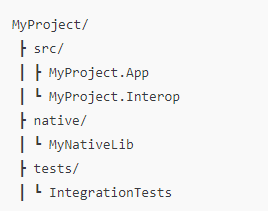
1. Isolate Your Interop Layer
Mini-Summary: Keep [DllImport] or COM references in a dedicated assembly for sanity and maintainability.
- Why It Helps: Centralizing your interop code keeps your main project cleaner and simplifies future changes.
- Example Directory Setup:
2. Pay Attention to Marshaling
Mini-Summary: Data type mismatches between managed and unmanaged code can cause crashes and memory leaks.
Common Pitfalls
intvs.longon different architectures.- Complex structs requiring
[MarshalAs]attributes.
Strings & Arrays
- Use
StringBuilderor[MarshalAs(UnmanagedType.LPStr)]for character arrays.
[DllImport("MyImageLib.dll", ExactSpelling = true)]
public static extern int ProcessImage(
    [MarshalAs(UnmanagedType.LPArray, SizeParamIndex=1)] byte[] data,
    int length
);
Question: What’s your trickiest marshaling scenario? Compare notes in the comments!
3. Use Meaningful Error Handling
Mini-Summary: Turn native error codes (HRESULT, etc.) into user-friendly C# exceptions.
int result = NativeMethods.ProcessData(data, data.Length);
if(result < 0)
    throw new InteropException($"ProcessData failed with code {result}.");
- COM Interop: Wrap HRESULT in custom exceptions.
- Unmanaged C++: Ensure consistent error codes or structured handling.
Mini-CTA: Share your worst debugging nightmare — someone might have a tip for you!
4. Benchmark for Performance
Mini-Summary: Each interop method introduces overhead—measure it before committing.
Recommended Tools:
- BenchmarkDotNet: Microbenchmarks.
- dotMemory or CLR Profiler: Memory usage and pinned object checks.
Read more: Mastering .NET Performance: How to Analyze and Optimize Memory (Heap Allocation)
[MemoryDiagnoser]
public class InteropBench
{
    private static readonly DataProcessor _processor = new();

    [Benchmark]
    public int ProcessViaPInvoke() => _processor.ComputeSum(testData);
}
Challenge: Run a microbenchmark comparing two approaches, then share your performance gains below!
5. Leverage .NET 6+ Features
Mini-Summary: New releases refine .NET performance and cross-platform integration.
- Single-file executables: Bundle dependencies into one package.
- Enhanced GC: Helps pinned objects in P/Invoke.
- Better Linux/macOS support: More straightforward cross-platform interop.
Question: Tried single-file publishing in .NET 6 or 7? Let us know how it helped your distribution!
6. Version Control Your Dependencies
Mini-Summary: Keep a “Dependencies.md” or pinned library list to avoid “DLL hell.”
- Why: Documenting each library’s version, source, and environment variables prevents confusion.
- Automation: Check for updates or changes that might break your assembly references.
Mini-CTA: Seen a mysterious “missing DLL” error? Share your fix below to help others avoid the same headache!
7. Test Extensively
Mini-Summary: Interop boundaries can harbor subtle bugs—test all layers.
- Unit Tests: Mock or simulate where possible.
- Integration Tests: Use real native libraries or COM objects.
- Stress Tests: Check for memory leaks, concurrency issues, or slowdowns.
Mini-CTA: Which testing framework do you prefer for interop — NUnit, xUnit, or MSTest?
4. Walkthrough Example: Calling a Native C++ Library
C++ (MyNativeLib.cpp)
extern "C" __declspec(dllexport)
int ProcessData(int* numbers, int length)
{
    int sum = 0;
    for(int i = 0; i < length; ++i)
        sum += numbers[i];
    return sum;
}
C# Wrapper (NativeMethods.cs)
using System.Runtime.InteropServices;

public static class NativeMethods
{
    [DllImport("MyNativeLib.dll", ExactSpelling = true)]
    public static extern int ProcessData(int[] numbers, int length);
}
Integration (DataProcessor.cs)
public class DataProcessor
{
    public int ComputeSum(int[] numbers)
    {
        return NativeMethods.ProcessData(numbers, numbers.Length);
    }
}
Main Program
public class Program
{
    public static void Main()
    {
        var processor = new DataProcessor();
        int[] sampleData = { 1, 2, 3, 4, 5 };
        int result = processor.ComputeSum(sampleData);
        Console.WriteLine($"Sum of array: {result}");
    }
}
Case Study: This pattern reduced compute times by ~40% in a production image-processing module.
5. Key Takeaways
- Use P/Invoke for straightforward native calls.
- Consider Mixed-Mode Assemblies for deeper C++ integration.
- Benchmark before finalizing your approach — don’t rely on guesswork.
- Version-control your native DLLs.
- Test thoroughly to catch subtle memory/pointer issues early.
6. References & Related Articles
Microsoft Docs:
Recommended Books:
- “C# in Depth: Fourth Edition” by Jon Skeet
- “.NET IL Assembler” by Serge Lidin (Deep-dive into .NET internals)
7. Challenge & Next Steps
- Try It Out
- Create a small C++ function (like a text parser) and call it from a .NET 6 console app.
- Post your code or GitHub link in the comments—I’d love to see your approach!
2. Looking for more?
- Are you interested in bridging COM to REST or tackling cross-platform .NET? If so, let me know below, and I might create part two.
3. Last Question
- What’s the biggest challenge you’ve faced bridging managed and unmanaged code? Let’s discuss this in the comments!
Clap, comment, or share if you found this guide helpful. Tag me on Twitter with
#DotNetInteropChallenge—I’d love to see your progress!
8. Simple Interop Diagram
 ┌─────────────────────┐
 │   .NET Layer (C#)   │
 │ (Managed Code)      │
 └─────────┬───────────┘
           │  P/Invoke or COM
 ┌─────────▼──────────┐
 │ Unmanaged Layer     │
 │ (C++/Native)        │
 └─────────────────────┘
(A basic flow showing how .NET calls into native libraries.)